
Designing a printed circuit board with another engineer normally involves exchanging project files, reviewing revisions and resolving competing changes. Junction, an independent open-source fork of KiCad, takes a different approach: multiple people can edit the same schematic or board simultaneously, whether they use a desktop application or a web browser. Version 2.2.2 was reported on November 23, 2026, by Adafruit.
Original developer discussion, November 16, 2026: the author explains the motivation for creating a collaborative PCB editor. Read on Reddit.
How simultaneous circuit design works
A schematic describes electrical connections between components. A PCB layout translates those connections into physical copper traces, footprints, vias and layers. Both representations must remain consistent. If one designer changes a connector while another routes its signals, an outdated copy of the board can create expensive rework.
The Junction repository describes live cursors, component selections and edits, as well as named checkpoints, comment threads and an item-level GitHub merge workflow. A desktop client can record changes while disconnected and synchronize them when connectivity returns. The project also documents a limitation: simultaneous changes to the same property resolve in favor of the later value, rather than merging both values.
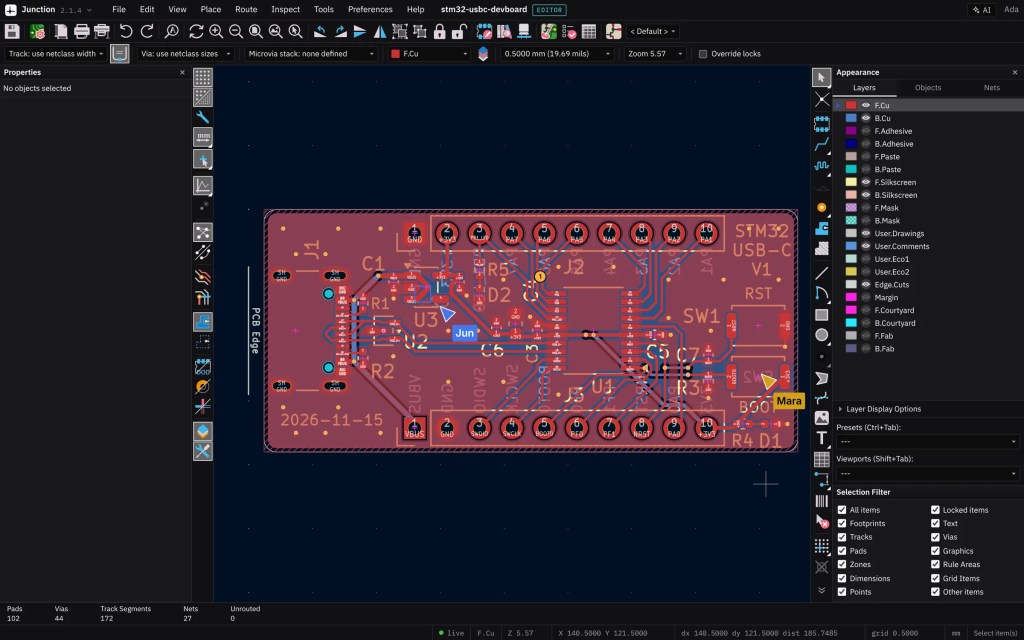
Junction is licensed under GPL-3.0 and opens ordinary KiCad project files from versions 6 through 10, according to its developers. It is not a plugin for stock KiCad. The project follows KiCad’s development branch and explicitly states that it is not endorsed by the upstream project.
An AI agent becomes another collaborator
Junction also exposes a Model Context Protocol (MCP) interface. An external assistant can work through a Python harness to place parts, connect nets and propose layout changes. The AI service supplies its own model; Junction does not independently select or invoke a foundation model. Project permissions determine whether the connected assistant can make edits.
The developer’s demonstration reconstructs a Raspberry Pi Pico board using real application sessions orchestrated by scripts. It illustrates synchronization, but the maintainers explicitly say the demonstration board has not been fabricated and powered. Electrical rules checks and design rules checks are useful safeguards, not proof that a circuit will operate correctly.
Independent KiCad 10 tutorial from The Design Graveyard: the video explains schematic capture, board layout, rule checks and fabrication output. It predates the Junction release and demonstrates standard KiCad rather than the collaborative fork. Watch on YouTube.
What engineering teams still need to verify
Before ordering a board, engineers must review component ratings, power sequencing, grounding, thermal performance and manufacturing limits. Our lessons on design rules and Gerber files, signal integrity, PCB assembly and board inspection explain why each stage matters.
Junction’s contribution is reducing friction between people and tools during design. Its browser editor may help remote teams review changes without installing software. Self-hosting is also documented, but operators remain responsible for access control, backups and protecting proprietary designs. No independent multiuser stress test or fabricated-board validation was performed for the article.
Primary sources: official project website, release history and the project repository.
We volunteer daily to ensure the credibility of the information on this platform is Verifiably True. If you would like to support to help further secure the integrity of our research initiative, please scan the QR code below.



Leave a Reply