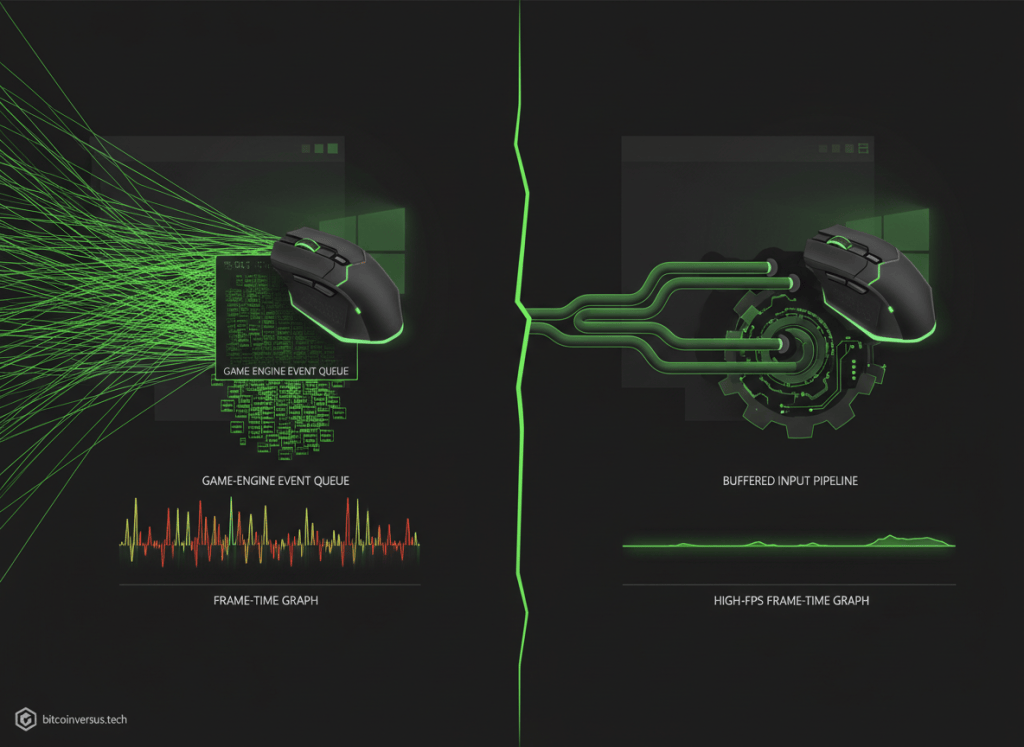
A gaming mouse can now report its position thousands of times per second. That sounds like an easy path to lower latency—until the operating system and game engine spend so much time processing mouse events that the game itself nearly stops rendering.
That was a real Windows performance cliff in Godot. In a detailed August 24 engineering report, Godot explained the fix that shipped with Godot 4.7.2: buffer raw mouse input, keep it from flooding the normal Windows message path, and limit legacy mouse-motion dispatch to at most once per frame.
The project’s official announcement described the change as a long-awaited fix for high-polling-rate mice on Windows.
An 8 kHz mouse can become an 8,000-calls-per-second coding problem
Polling rate is the frequency at which a mouse can report updates. A traditional 125 Hz device reports roughly every 8 milliseconds. Modern gaming mice can run at 2 kHz, 4 kHz or even 8 kHz, reducing the age of the latest available input sample and making updates more consistent on very high-refresh displays.
But software has to consume those events. Godot notes that if input accumulation is disabled, mouse-motion callbacks can potentially execute on every update—up to 8,000 calls per second with an 8 kHz mouse. Even with accumulation enabled, a game running on a 480 Hz display may execute the relevant input path hundreds of times every second.
That makes this a useful game-programming lesson: an input callback should be treated like a hot loop. Expensive work inside _input() or _unhandled_input() can multiply rapidly when event frequency rises.
Why Windows was getting buried in mouse messages
Windows exposes both legacy mouse motion through WM_MOUSEMOVE and raw input through WM_INPUT. Raw input is valuable to games because it avoids operating-system mouse acceleration, but requesting it does not automatically stop legacy mouse messages from arriving.
At very high polling rates, that combination can congest the event-processing path. Godot measured extreme cases where moving an 8 kHz mouse could push captured-mouse performance from thousands of frames per second to below 1 FPS before the fix.
A GameDev.net technical briefing summarizes the same architecture: buffered raw reads, delayed WM_INPUT dispatch, and legacy motion constrained so it cannot overwhelm the frame loop.
The fix is an event-queue lesson
Godot now performs buffered reads in DisplayServerWindows::process_raw_input(). In DisplayServerWindows::process_events(), the engine uses the Windows API PeekMessageW() so raw input can remain queued for the next buffered read instead of being dispatched immediately through the expensive path. Legacy WM_MOUSEMOVE and WM_NCMOUSEMOVE events are handled separately and dispatched at most once per frame.
The design is a clean example of batching: when thousands of nearly identical events arrive faster than the rest of the application needs to react to them individually, process them in a way that preserves useful information without forcing the whole engine to pay the full per-event cost.
The numbers show why low-level code matters
In Godot’s uncapped captured-mouse test, an 8 kHz mouse went from below 1 FPS before the fix to roughly 1,703 FPS afterward. In another 480 FPS V-Sync test, the engine moved from below 1 FPS to about 477 FPS. Godot reported a 45.8× increase in the 1% low FPS figure in one comparison.
Those results make the story more than a peripheral tweak. A few changes to how the engine reads and dispatches operating-system events can determine whether a game feels broken or essentially locked to its target frame rate.
It connects directly to the coding lessons
The same fundamentals behind our lesson on abstraction show up here at a lower level. The game sees an input-event abstraction; underneath it, platform-specific code has to translate Windows messages into engine events efficiently.
Our Unity coding-agent story focused on engine-aware development and verification. This Godot fix shows why that engine awareness matters: code that is logically correct can still be catastrophically slow if it ignores the frequency and cost of the platform events underneath it.
And the recently published Godot 4.8 Dev 7 coding story shows the other side of the same open-source development cycle—language tooling and engine APIs improving while maintainers continue attacking low-level runtime bottlenecks.
A simple rule for game code: count how often it runs
A function that costs almost nothing once can become expensive when called 8,000 times per second. That principle applies to mouse input, physics callbacks, network packets, render loops and AI updates.
Godot’s mouse fix is a compact example of performance engineering students can carry into their own projects: profile the hot path, understand the event source, batch work where semantics allow it, and verify the result with frame-time measurements rather than assuming faster hardware will hide inefficient code.
BitcoinVersus.Tech
Advertisement
Editor’s Note
We volunteer daily to ensure the credibility of the information on this platform is Verifiably True. If you would like to support to help further secure the integrity of our research initiatives, please donate here: 3C9o19EH5HSiwEPyCTmEKzxhNCbo2X6TTb
BitcoinVersus.tech is not a financial advisor. This media platform reports on financial subjects purely for informational purposes.


Leave a Reply