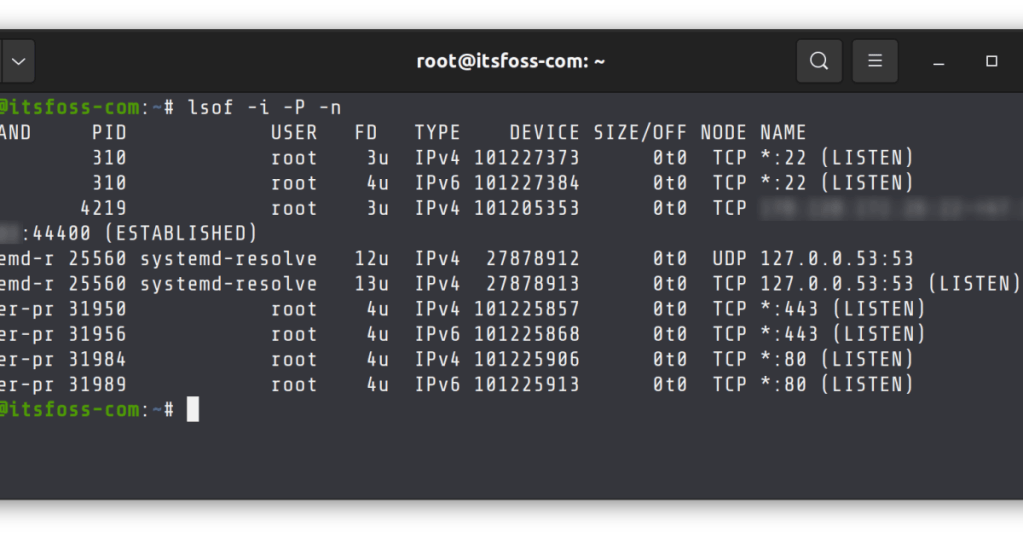
A file descriptor, usually shortened to FD, is a small integer that a process uses to refer to an open file or another I/O resource. On Linux and other Unix-like systems, that resource might be a regular file, terminal, socket, pipe, device, or other kernel-managed object.
The easiest way to remember it is: the program asks the kernel to open something, and the kernel gives the program a number. The program then passes that number back to the Linux kernel whenever it wants to read, write, configure, or close that resource.
open() Returns a Number, Not the File Itself
When a process opens a file, it normally enters the kernel through a system call. Linux then creates or references the kernel-side open-file state and returns a nonnegative integer to the process. The Linux open(2) manual describes that return value as a file descriptor that the calling process can later use with operations such as read(), write(), and close().
If a program receives FD 7, the number 7 is not the file’s location on disk. It is an index into that process’s file-descriptor table. The kernel uses the descriptor to find the actual open-file information and then performs the requested operation on behalf of the process.
0, 1, and 2 Are Usually stdin, stdout, and stderr
Unix programs traditionally begin with three familiar descriptors already open: FD 0 = standard input (stdin), FD 1 = standard output (stdout), and FD 2 = standard error (stderr). A shell command can therefore read from 0 and write normal output to 1 while sending errors separately to 2.
This is why shell redirection syntax works. command > output.txt changes where stdout goes. command 2> errors.txt redirects stderr. command > all.log 2>&1 arranges for both output streams to reach the same destination.
File Descriptors Are Not Limited to Files
The word “file” can be misleading. A descriptor can refer to a disk file, but it can also represent a network socket, pipe, terminal, device, event object, or other resource exposed through Unix-style I/O. That is one reason Linux software can use similar read() and write() patterns across very different kinds of I/O.
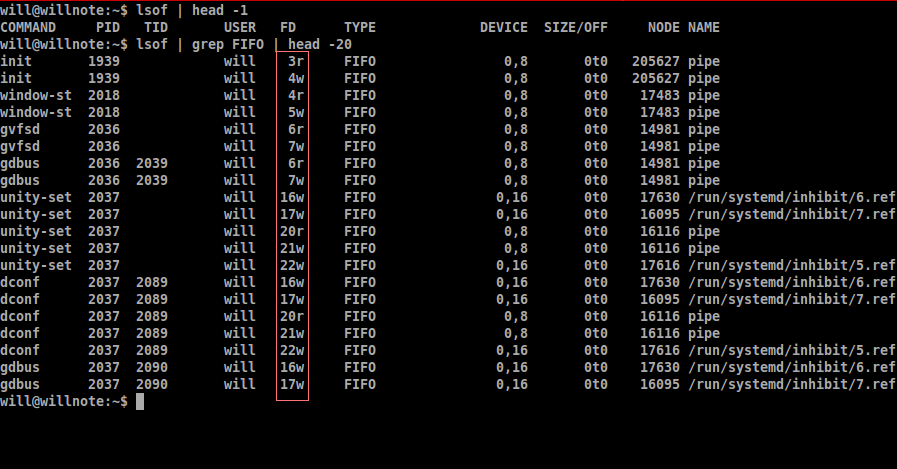
lsof output exposes real FD numbers and FIFO pipe entries, showing how pipe endpoints are represented as open descriptors. Source image: Stack Overflow discussion.Sockets Use File Descriptors Too
When software creates a network socket, the kernel can return a file descriptor for that socket. The application then uses the descriptor while calling networking functions to send and receive data. That connects file descriptors directly to the TCP and UDP concepts already covered on BitcoinVersus.Tech.
A web server handling thousands of client connections can therefore have thousands of descriptors open at once: listening sockets, accepted client sockets, log files, configuration files, pipes, and other resources.
Pipes Are Also Descriptors
A pipe connects the output of one process to the input of another. Internally, the processes work with descriptors that refer to the pipe endpoints. The shell hides most of this complexity when you run a command such as journalctl | grep error, but underneath, one process writes to a pipe descriptor while another reads from a corresponding descriptor.
This is another place where the process model matters: each process has its own descriptor table even when multiple processes ultimately refer to the same underlying pipe or open-file object.
Descriptors Belong to a Process
FD 4 in one process does not have to refer to the same thing as FD 4 in another process. The number only has meaning inside that process’s descriptor table. That is why debugging open files usually starts with a PID and then asks which descriptors belong to that specific process.
Processes can also inherit descriptors across process creation and program execution unless the software deliberately closes them or uses close-on-exec behavior. This inheritance is powerful for shells, servers, pipelines, and service managers, but an accidental inherited descriptor can also keep a file, pipe, or socket open longer than expected.
/proc/$$/fd/77, lsof, and process information.Linux Exposes Descriptors Through /proc/PID/fd
Linux exposes a process’s open descriptors under /proc/PID/fd/. Each entry is a symbolic link whose name is the descriptor number. The kernel’s /proc filesystem documentation explains how process information is exposed through this virtual filesystem.
ls -l /proc/1234/fd/

# Common examples might look like:
0 -> /dev/pts/0
1 -> /dev/pts/0
2 -> /dev/pts/0
3 -> /var/log/app.log
4 -> socket:[123456]
5 -> pipe:[789012]
That one directory makes the abstraction visible: descriptor numbers on the left, kernel-managed resources on the right.
lsof Turns Open Descriptors Into a Troubleshooting Tool
lsof means “list open files.” Because Unix treats many resources through file-like interfaces, its output can reveal regular files, sockets, pipes, devices, current working directories, memory mappings, and their descriptor values. For a specific process, lsof -p PID is often one of the fastest ways to inspect what it currently has open.
lsof -p 1234
lsof -i
ls -l /proc/1234/fd/
cat /proc/1234/limits | grep -i "open files"
Too Many Open Files Usually Means the Process Hit a Limit
Every process operates under resource limits. If software continually opens files or sockets without closing them, the descriptor count can grow until a system or per-process limit is reached. The program may then fail with errors such as “Too many open files.”
The important troubleshooting question is not merely “How do I raise the limit?” First ask why the process needs so many descriptors. A high count may be legitimate for a busy proxy, database, or web server, but it can also indicate a descriptor leak where code repeatedly opens resources and never closes them.
close() Releases the Descriptor
When software finishes using a descriptor, it should close it. Closing removes that descriptor from the process table and lets the kernel release the process’s reference to the underlying resource. If other descriptors or processes still reference the same object, the object itself may remain alive until those references disappear too.
This reference behavior explains several confusing Linux situations: a deleted file can continue consuming disk space while a process still has it open, a pipe can stay alive because another inherited descriptor remains open, or a listening socket can remain tied to a process that never released it.
File Descriptors Connect System Calls, Buffers, and I/O
The recent BitcoinVersus fundamentals fit together here. A program enters the kernel through a system call. The kernel uses the process’s descriptor to identify the target resource. Data may then move through buffers, network queues, storage layers, device drivers, or sockets depending on what that descriptor represents.
A simple chain looks like this: application → system call → file descriptor → kernel object → file/socket/pipe/device → buffer or hardware path → result returned to the application.
Windows Uses Handles for a Similar Purpose
Windows uses a broader handle model instead of Unix-style file descriptors for many kernel objects. The concepts are related—a process gets a small reference that identifies a kernel-managed resource—but the APIs and object models are different. Do not treat a Windows HANDLE as numerically or behaviorally identical to a Linux file descriptor.
The Simple Way to Remember File Descriptors
A file descriptor is a process-local integer that tells the kernel which open I/O resource the program means. FD 0 is usually stdin, 1 is stdout, and 2 is stderr. Higher numbers can represent files, sockets, pipes, devices, and other resources.
For troubleshooting, remember four questions: Which process owns the descriptor? What number is it? What resource does it point to? Is the process closing descriptors when it is done? Those questions explain shell redirection, sockets, pipes, open-file limits, and many “too many open files” failures.
Editor’s Note
The featured image is a directly relevant 1200×630 Linux lsof capture showing FD values attached to TCP and UDP sockets; the body image is a separate terminal capture showing real FD numbers and FIFO pipe entries. No unrelated generic computer photography is used. The two YouTube videos are distinct and directly about file descriptors, stdin/stdout/stderr, redirection, and pipes. The Reddit embed directly demonstrates inspecting a live descriptor with /proc and lsof.
Support and donation options are available through BitcoinVersus.Tech.
BitcoinVersus.Tech is not a financial advisor. Content is provided for informational and educational purposes.


Leave a comment