
OSPCB.003 — Open-Source Printed Circuit Board | Foundational Lesson
Match the Part to the Board
A component footprint describes how a physical part mounts on a printed circuit board. Its land pattern defines the conductive pads and their arrangement; a CAD footprint also includes assembly information such as the body outline and courtyard. After identifying pads, vias and through-holes, the next step is choosing a pattern that fits the exact component package. KiCad’s getting-started guide explains how symbols acquire their physical footprints.
Key Takeaways
- A schematic symbol describes electrical function; a footprint describes the physical board attachment.
- Match the exact package, lead spacing, pad dimensions and pin numbering to the manufacturer’s documentation.
- A plausible 3D appearance is useful evidence, but dimensions and electrical mapping still need checking.
Check Geometry and Pin Numbers
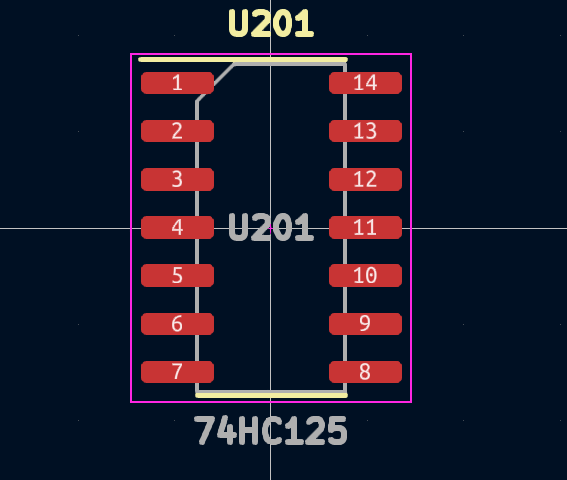
Two eight-pin packages can require different footprints. Check body width, lead span and pitch—the distance between adjacent pin centers—plus any exposed thermal pad. Through-hole parts also require the correct hole diameter. In KiCad, a pad receives the net of the same-numbered schematic pin, as the PCB Editor manual specifies. Confirm pin 1 and whether the datasheet drawing shows a top or bottom view; confusing those views can reverse the apparent pin arrangement.
Verify Before Ordering
Compare the selected footprint with the exact manufacturer part number and package drawing, then inspect its pads, polarity marks and component courtyard. A courtyard reserves space around the component for assembly. The KiCad silkscreen conventions explain visible body and orientation markings. Use the 3D viewer and design-rule checks as supporting checks: neither independently establishes that a library footprint matches the part you will purchase. This physical review complements the schematic-to-board workflow and the board’s copper-layer construction.
Community Example
Five-Minute Practice
- Choose one loose, unpowered component and its exact manufacturer datasheet.
- Record its package name, pin count, pitch and pin-1 identifier.
- Open a candidate footprint and compare its dimensions and pad numbers.
- For a through-hole part, distinguish lead spacing from hole diameter; they are different measurements.
- Record any mismatch before routing copper or ordering boards.
Knowledge Check
- Does matching pin count prove a footprint fits? No. Package dimensions, spacing and other physical requirements must also match.
- What connects schematic pin 1 to footprint pad 1 in KiCad? Their matching numbers.
- What is the main lesson? Verify the physical package and the electrical pin mapping together.
BitcoinVersus.Tech Editor’s Note:
We volunteer daily to ensure the credibility of the information on this platform is Verifiably True. If you would like to support to help further secure the integrity of our research initiatives, please donate using the QR code provided

For best QR-code scanning results, please scan this donation code from a desktop or larger screen. Mobile screens may prevent camera recognition.


Leave a Reply