A network can have enormous bandwidth and still feel slow. That happens because bandwidth, throughput, and latency measure three different parts of network performance.
The simplest way to separate them is this: bandwidth is how much data a link can theoretically carry, throughput is how much data actually gets through, and latency is how long the trip takes.
Bandwidth Is the Maximum Capacity
Bandwidth describes the rated or maximum data-carrying capacity of a network link, usually measured in bits per second such as Mbps, Gbps, or Tbps. A 1 Gbps Ethernet link is engineered to carry up to one gigabit of data per second under the right conditions.
Cisco’s network-performance guidance makes the important point that interface speed in bits per second is only one part of device performance. Packet rate, connection rate, feature processing, and concurrent workloads can also become bottlenecks.
Think of bandwidth as the number of lanes on a highway. More lanes let more cars travel at the same time, but adding lanes does not automatically shorten the distance between two cities.
Throughput Is What the Network Actually Delivers
Throughput is the real measured transfer rate achieved across the network. A link may negotiate at 1 Gbps while an actual file transfer reaches only 620 Mbps.
The missing 380 Mbps is not necessarily evidence that something is broken. Real networks carry Ethernet framing, IP and TCP or UDP headers, acknowledgements, retransmissions, management traffic, and competing application traffic. Switches, routers, storage systems, servers, firewalls, Wi-Fi interference, and congestion can all reduce end-to-end throughput below the link’s nominal bandwidth.
This distinction becomes even more important as Ethernet moves into the terabit era. BitcoinVersus.Tech recently covered 1.6T Ethernet moving toward data-center deployment. A 1.6 Tbps port gives the network enormous theoretical capacity, but applications still depend on the entire path delivering useful throughput.
Latency Is the Delay
Latency measures time rather than capacity. It describes how long data takes to travel from one point to another. Network latency is commonly discussed in milliseconds, and many tools measure round-trip time, or RTT, which includes the trip to the destination and back.
Cloudflare’s latency explainer notes that physical distance is one unavoidable contributor, while routers, network handoffs, processing, and congestion can add additional delay.
A connection with 10 Gbps of bandwidth can therefore still have 80 ms of latency. The link can move a huge amount of data, but each interaction may still wait tens of milliseconds for the network round trip.
A 1 Gbps Example Makes the Difference Clear
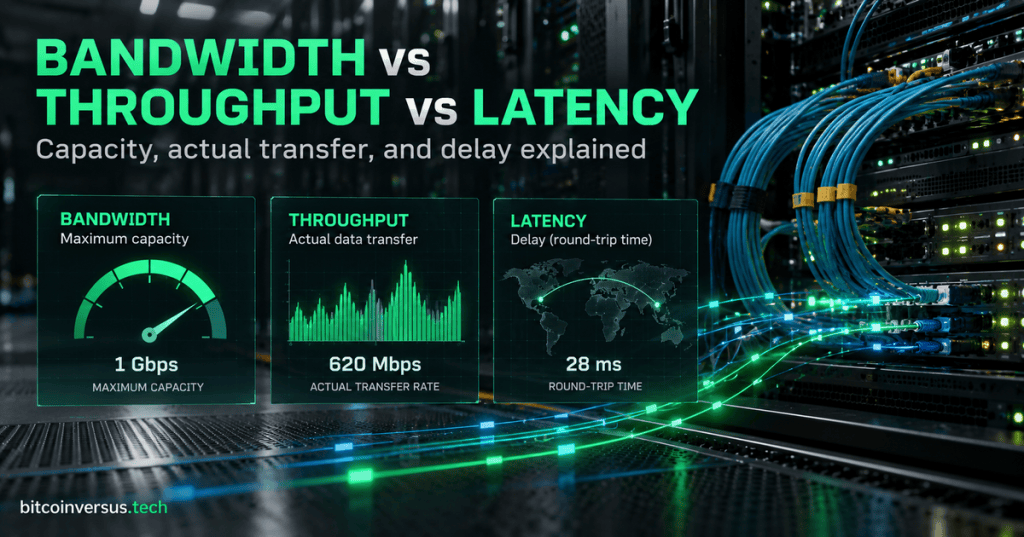
Imagine a server connected through a 1 Gbps path. A test reports 620 Mbps of sustained throughput and 28 ms of round-trip latency.
Bandwidth: 1 Gbps. That is the maximum capacity of the link or path being discussed.
Throughput: 620 Mbps. That is the data rate the test actually achieved.
Latency: 28 ms RTT. That is the delay for a packet to travel to the destination and for the response to come back.
Those three numbers can all be true at the same time.
More Bandwidth Does Not Automatically Fix High Latency
This is one of the most useful troubleshooting rules in networking. If the problem is that a large backup takes too long because the connection is saturated, more bandwidth may help immediately. If the problem is a distant application taking too long to respond to many small requests, adding bandwidth may do very little.
That is why private cloud interconnects are sold on more than headline port capacity. BitcoinVersus.Tech’s look at the AWS and Azure managed private multicloud interconnect highlighted predictable latency and high throughput alongside capacity and encryption.
Why AI Networks Care About All Three
AI training networks move enormous amounts of data between accelerators, switches, storage, and other systems. They need wide links for bandwidth, high sustained transfer rates for throughput, and low communication delay so processors spend less time waiting on remote data or collective operations.
That is why optical roadmaps keep pushing both capacity and system performance. BitcoinVersus.Tech recently covered Ciena targeting 200T AI interconnects with 6.4T optics. Bigger pipes matter, but the useful result still depends on the network delivering data consistently and quickly end to end.
Do Not Forget Goodput
Engineers sometimes use one more term: goodput. Goodput is the rate of useful application payload delivered after protocol overhead and retransmitted data are excluded. A network can therefore report high raw throughput while the application receives a smaller amount of useful data.
This is especially helpful when diagnosing file transfers, storage traffic, encrypted tunnels, or noisy links where retransmissions consume a meaningful part of the available capacity.
The Simple Mental Model
Bandwidth is the size of the pipe. Throughput is the amount of data actually flowing through it. Latency is how long the trip takes.
If you remember those three definitions, most “the network is slow” conversations become easier to diagnose. The next question is no longer simply “How fast is the link?” It becomes: is the problem capacity, actual transfer performance, delay, or some combination of all three?
BitcoinVersus.Tech
Advertisement
Editor’s Note
We volunteer daily to ensure the credibility of the information on this platform is Verifiably True. If you would like to support our research and publishing work, please donate here: 3C9o19EH5HSiwEPyCTmEKzxhNCbo2X6TTb
BitcoinVersus.tech is not a financial advisor. Content is provided for informational purposes.


Leave a Reply