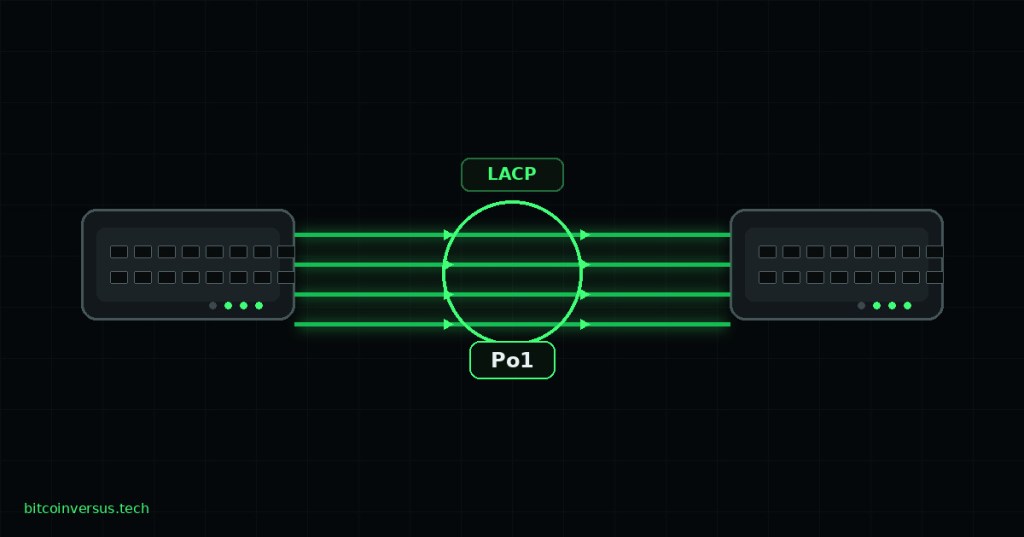
Elementary overview: link aggregation lets several physical Ethernet connections behave like one logical link. Instead of forcing Spanning Tree Protocol (STP) to block most parallel Layer 2 links, a properly formed bundle can keep multiple member links active while the network treats them as one logical interface. Link Aggregation Control Protocol (LACP) is the standards-based control protocol commonly used to negotiate and maintain that bundle.
Why Link Aggregation Exists
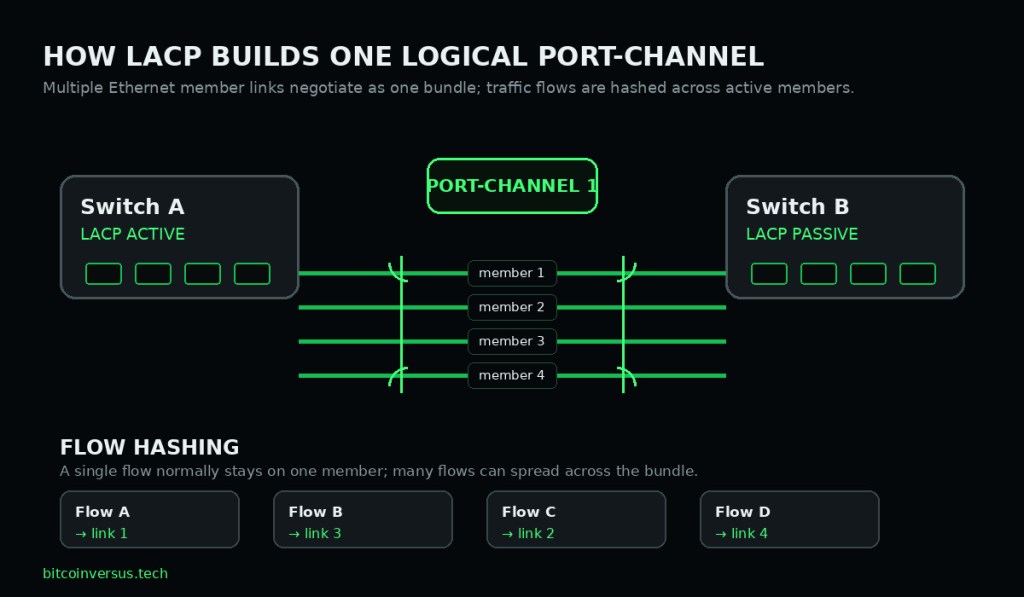
Imagine two switches connected by four 1 Gb/s Ethernet cables. If those cables are simply four independent Layer 2 paths, STP may place redundant paths into a non-forwarding state to prevent a switching loop. Link aggregation changes the topology presented to the rest of the network: the parallel member links are grouped into a Link Aggregation Group (LAG), and the MAC client can treat the group as a single logical link. IEEE 802.1AX defines this basic model for full-duplex point-to-point links.
The result is useful for two reasons: aggregate capacity can increase across many simultaneous traffic flows, and the logical link can remain available when an individual member link fails. That is different from saying one single flow automatically becomes four times faster. Actual traffic distribution depends on the platform’s load-balancing method and the characteristics of the flows.
LAG, EtherChannel, and Port-Channel Are Related Terms
LAG is the generic idea: multiple physical links acting as one logical link. EtherChannel is Cisco terminology for its link-bundling feature. A port-channel is the logical interface representing the bundle on Cisco-style platforms. Other vendors use terms such as LAG, bond, aggregate Ethernet, trunk group, or team, but the central concept is similar.
The member interfaces are still real physical Ethernet ports. Their electrical or optical link state, negotiated speed, duplex behavior, cabling, and interface errors still matter. If a member will not join a bundle, first confirm the fundamentals from OSNTC.018: Ethernet Link Negotiation and, for copper, OSNTC.017: Copper Ethernet Cabling.
LACP Negotiates the Bundle
LACP exchanges control information so devices can decide which compatible links belong in the same aggregation. Cisco’s current EtherChannel documentation lists factors such as speed, duplex, native VLAN, and trunking state among the properties that can affect whether ports are dynamically grouped. The exact compatibility checks and limits are platform-specific, so production work should always use the documentation for the actual switch model and software release.
Active and Passive LACP Modes
| Side A | Side B | Result |
|---|---|---|
| active | active | Can form because both sides initiate LACP |
| active | passive | Can form because the active side initiates |
| passive | active | Can form because the active side initiates |
| passive | passive | Does not form through LACP because neither side initiates |
Active mode sends LACP packets to begin negotiation. Passive mode responds when it receives LACP traffic but does not initiate the negotiation itself. For that reason, active/active and active/passive combinations can form, while passive/passive does not.
All Member Links Must Agree on the Important Parameters
A port-channel is not a license to mix unrelated interfaces. The members must be sufficiently compatible to operate as one logical link. On a Layer 2 bundle, this commonly means consistent speed, duplex, switchport mode, native VLAN, allowed VLANs, and other relevant port settings. A mismatch can prevent a member from bundling or can place it into an individual, suspended, or otherwise non-forwarding state depending on the platform.
This is why VLAN configuration matters. If two member links disagree about trunk state or VLAN handling, the logical interface would not behave consistently. A strong technician therefore compares both the physical member configuration and the logical port-channel configuration instead of checking only whether the LEDs are green.
STP Sees the Bundle as One Logical Path
One of the most important connections to the previous lesson is that a correctly formed Layer 2 EtherChannel is presented to STP as a single logical port. STP therefore makes its topology decision about the port-channel rather than treating every member as a separate parallel forwarding path. This is how a bundle can use multiple physical links without creating the same Layer 2 loop that four independent forwarding links would create.
That does not mean STP becomes unnecessary. Port-channels can still participate in larger redundant Layer 2 topologies, and STP can block an entire logical port-channel if the overall topology requires it. Link aggregation solves one problem—bundling parallel links between endpoints—while STP still protects the broader switched topology.
Load Balancing Usually Works by Hashing Flows
Switches generally do not take every Ethernet frame from one conversation and round-robin successive frames across different members. Instead, platforms normally use a hashing decision based on fields such as source/destination MAC addresses, IP addresses, and sometimes transport-layer ports. That helps keep frames belonging to a flow on a consistent member link and avoids creating unnecessary packet reordering.
This creates an important technician lesson: four 1 Gb/s members do not guarantee one 4 Gb/s flow. The bundle may offer roughly 4 Gb/s of aggregate forwarding capacity across many well-distributed flows, but one flow can still be limited by the capacity of the member selected for it. This is the same reason bandwidth and throughput should not be treated as interchangeable.
Failure Recovery Happens at the Member Level
If one active member link fails, a healthy aggregation can continue operating on the remaining active members. The available aggregate capacity drops, and the device redistributes affected traffic according to its platform behavior. Recovery time is not guaranteed to be literally zero; forwarding behavior depends on hardware, software, hashing, timers, and the nature of the failure. The important point is that losing one cable does not necessarily mean losing the entire logical link.
Some platforms also support minimum-link policies. Cisco documents port-channel min-links behavior that can intentionally hold a port-channel down when too few members remain active to provide the required capacity. That can be safer than silently running a critical service on a severely degraded bundle.
Basic Cisco LACP Configuration Example
configure terminal
interface range GigabitEthernet1/0/1-2
 switchport mode trunk
 channel-group 1 mode active
 exit
interface Port-channel1
 switchport mode trunk
end

show etherchannel summary
show lacp neighbor
show interfaces port-channel 1
This is an example, not a universal copy-and-paste configuration. Interface names, supported commands, maximum bundle size, load-balancing choices, and whether configuration belongs on the members or the logical interface vary by platform. Always confirm the syntax for the device in front of you before changing production networking.
What to Verify Before You Change Anything
- Physical state: Are all intended member links actually up, with expected speed and duplex?
- Bundle state: Does
show etherchannel summaryshow the expected logical channel and bundled members? - LACP neighbor: Does each side see the expected partner and member ports?
- Mode pairing: Is at least one side active?
- Layer 2 consistency: Do access/trunk mode, native VLAN, and allowed VLANs match?
- Logical interface: Is the port-channel itself up and carrying the expected VLANs or Layer 3 addressing?
- STP state: Is the logical port-channel forwarding or intentionally blocked by spanning tree?
- Errors: Are any members showing CRC errors, drops, flaps, or negotiation problems?
Common Failure Patterns
- Passive + passive: neither side initiates LACP, so the bundle does not form.
- Speed or duplex mismatch: one member is incompatible with the rest of the group.
- Trunk mismatch: one side or one member is configured differently.
- VLAN mismatch: native or allowed VLAN settings do not agree.
- Wrong cables or ports: the intended members do not actually terminate on the expected peer.
- Static bundle mismatch: a forced bundle can remove some protocol-level protection against incorrect cabling or configuration.
- Uneven utilization: the bundle is healthy, but the traffic hash places heavy flows on the same member.
- Partial physical failure: the port-channel stays up but loses aggregate capacity because one or more members fail.
Simple Packet Tracer Lab
- Place two switches in Cisco Packet Tracer.
- Connect two or more matching Ethernet interfaces between them.
- Configure both member sets as trunks.
- Configure one switch with LACP
activeand the other withpassive. - Run
show etherchannel summaryand confirm the members are bundled. - Run
show lacp neighborand identify the peer. - Generate traffic through the switches.
- Disconnect one member cable and confirm that the logical port-channel remains operational on the surviving member or members.
- Reconnect the member and observe it rejoin the bundle.
- Change both sides to passive and observe that LACP no longer initiates formation; restore a valid mode pairing afterward.
Technician Mental Model
Think of a port-channel as one logical interface with several physical lanes underneath it. LACP helps the two endpoints agree on which lanes belong in the same road. STP sees the road rather than every individual lane. A traffic hash decides which lane a given flow uses, and a failed lane can be removed while the road continues on the remaining members.
Exercises
- Explain in your own words why four independent switch links can create an STP problem while four links in one port-channel do not create the same parallel-link topology.
- Write the four active/passive LACP combinations and mark which three can form.
- On a lab switch, compare
show interfaces,show etherchannel summary, andshow lacp neighbor. Write down what unique information each command provides. - Create a two-member bundle, unplug one member, and record what changes in logical state, member state, and available aggregate capacity.
- Explain why one large data transfer may not use the combined bandwidth of every member even when the bundle is healthy.
Knowledge Check + Answers
- What is a LAG? A Link Aggregation Group: multiple physical links presented as one logical link.
- What is LACP? The control protocol used to negotiate and maintain standards-based link aggregation.
- What does active mode do? It initiates LACP negotiation by sending LACP packets.
- Will passive/passive form an LACP bundle? No, because neither side initiates negotiation.
- What does STP see on a correctly formed Layer 2 port-channel? One logical port rather than each member as an independent parallel path.
- Does four 1 Gb/s members guarantee one 4 Gb/s TCP flow? No. Traffic is typically distributed by a hash, so one flow normally stays on one member.
- What happens if one member fails? The bundle can continue on remaining active members, though aggregate capacity decreases and recovery behavior is platform-dependent.
- Why must member configurations be consistent? The links must behave as one logical interface; incompatible speed, duplex, VLAN, or trunk settings can keep members from bundling correctly.
Primary Technical References
- IEEE 802.1AX-2020 — Link Aggregation
- Cisco EtherChannel Configuration Guide — EtherChannels
- Cisco — Understanding EtherChannel Load Balance and Redundancy
Elementary Review
LACP is how compatible physical Ethernet links can negotiate into one logical bundle. The port-channel can provide aggregate capacity and member-level redundancy, STP treats the bundle as one logical path, and a hashing algorithm distributes traffic flows across members. When a bundle fails to form, verify the physical links, LACP mode, member configuration, VLAN/trunk consistency, logical port-channel state, and peer information before making changes.
Editor’s Note
The featured artwork is a unique 1200×630 technical cover created specifically for OSNTC.020 under the tightened BitcoinVersus/Open CERT cover-art rule and is not reused inside the body. The separate 1200×700 teaching diagram illustrates the LACP bundle and flow-hashing model. Vendor commands are examples and should be checked against the exact platform before production use.
BitcoinVersus.Tech content is provided for informational and educational purposes.


Leave a Reply