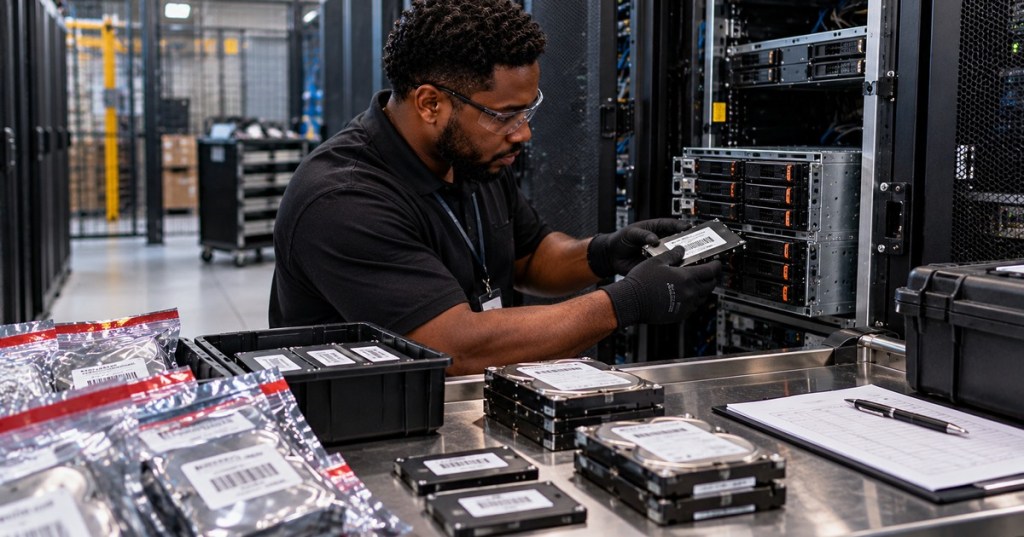
Server decommissioning is a controlled removal process, not just unplugging a machine and carrying it out of the data center. A technician must account for the asset, preserve change records, disconnect the correct power and network paths, identify every data-bearing component, apply the approved sanitization method, verify the result, and maintain chain of custody until reuse, recycling, or destruction is complete.
This lesson follows OSDCTC.008: Server Network Configuration and Validation. OSDCTC.008 proved a server was attached to the correct production network. OSDCTC.009 covers the other end of the lifecycle: safely removing that server from service without losing asset control or exposing residual data.
Securis — overview of NIST SP 800-88 media-sanitization concepts and the Clear, Purge, and Destroy categories.
Learning Objectives
- Build a decommissioning checklist that protects uptime, asset records, and data confidentiality.
- Identify data-bearing components inside a modern server.
- Explain the difference among Clear, Purge, and Destroy under NIST SP 800-88 Rev. 2.
- Explain why cryptographic erase can be appropriate for properly encrypted media.
- Understand why deleting files, formatting a volume, or rebuilding RAID is not automatically media sanitization.
- Maintain serial-number inventory and chain of custody during removal.
- Verify sanitization before reuse, resale, recycling, or disposal.
- Recognize when physical destruction is required by policy.
Use the Current Standard
NIST published SP 800-88 Rev. 2, Guidelines for Media Sanitization in September 2025, replacing Revision 1 from 2014. The current revision emphasizes an organizational sanitization program, validation, documentation, risk-based method selection, and trust in the implementation of sanitization techniques.
NIST defines media sanitization as rendering access to target data infeasible for a given level of effort. The technician does not choose a sanitization method based on convenience alone. The method must match the organization’s approved policy, the sensitivity of the data, the media technology, the condition of the device, and the intended destination after decommissioning.
Decommissioning Starts Before Power-Off
Before touching the rack, confirm the approved work order and the exact server identity. Compare hostname, asset tag, serial number, rack, U position, BMC address, service owner, and planned disposition. A wrong-server decommission can create an outage even if every later step is technically perfect.
- Confirm the change ticket and maintenance window.
- Confirm the application or service has been drained, migrated, or retired.
- Confirm backups or required retention actions are complete.
- Record the server serial number and asset tag.
- Record the storage-device serial numbers before removal when practical.
- Record switch ports, PDU outlets, rack position, and cable IDs if the site requires infrastructure reconciliation.
- Confirm the final destination: internal reuse, vendor return, resale, recycling, or destruction.
Identify Every Data-Bearing Component
The obvious storage devices are HDDs, SATA SSDs, SAS SSDs, and NVMe drives. Modern servers can also retain information in less obvious places. Depending on the platform, data or configuration may exist in RAID-controller cache, NVDIMMs or persistent-memory devices, boot modules, SD cards, USB media, management-controller flash, TPM-related storage, internal M.2 devices, or add-in accelerators with persistent local storage.
Review OSDCTC.005: Server Hardware Troubleshooting and OSDCTC.006: BMC and Out-of-Band Server Management when building the component inventory. The goal is to prevent a small overlooked device from leaving the controlled environment with residual data.
Clear, Purge, and Destroy
NIST SP 800-88 uses three sanitization categories: Clear, Purge, and Destroy. These describe increasing levels of assurance and different reuse outcomes.
- Clear: applies logical techniques that protect against ordinary noninvasive data recovery while typically preserving the media for reuse.
- Purge: uses a stronger technique intended to make recovery infeasible even with more advanced laboratory-level methods while typically preserving the media when the approved technique supports reuse.
- Destroy: physically renders the media unusable so data cannot be recovered through normal reuse of the device.
The exact approved technique for a specific HDD, SSD, NVMe device, tape, optical medium, or other media type must come from the organization’s current sanitization standard and the device manufacturer’s supported capabilities. NIST Rev. 2 directs organizations toward current standards such as IEEE 2883, NSA specifications where applicable, and organizationally approved methods rather than treating one old generic overwrite recipe as universal.
Chia Decentral — practical overview of device-native sanitize operations, block erase, overwrite, and cryptographic erase concepts for SSD and HDD media.
Why Delete and Format Are Not Enough
Deleting a file usually changes filesystem metadata. Quick formatting typically recreates filesystem structures. Rebuilding a RAID array changes array metadata and layout. None of those actions should automatically be treated as approved media sanitization.
Enterprise storage devices contain controller-managed areas that the operating system does not directly manage. SSDs also use wear leveling, spare blocks, remapped blocks, and overprovisioned capacity. A host-level overwrite that appears complete may not address every physical location in the same way a device-supported sanitize mechanism does.
Cryptographic Erase
Cryptographic erase renders previously encrypted data inaccessible by securely eliminating or changing the cryptographic key required to decrypt that data. NIST Rev. 2 gives cryptographic erase significant attention because modern storage commonly encrypts data internally.
Cryptographic erase is only trustworthy when the encryption implementation and key-management assumptions are trustworthy. The data must have been properly encrypted before sanitization, the relevant key material must actually be sanitized, and the media implementation must meet the organization’s assurance requirements. A label that says “self-encrypting drive” is not enough by itself.
Dell’s SSD data-removal guidance distinguishes ATA Secure Erase, cryptographic erase on self-encrypting SSDs, and media destruction. Kingston likewise explains that cryptographic erase removes or replaces the encryption key rather than rewriting every NAND cell.
Do Not Degauss an SSD and Call It Sanitized
Degaussing acts on magnetic media. SSDs store data electrically in flash memory rather than magnetically. A degausser therefore does not provide the same sanitization mechanism for NAND flash that it can provide for supported magnetic media.
This is a classic media-type mistake. The technician must identify the actual storage technology before selecting the approved sanitization path.
Data-center discussion — operators describe why some organizations keep drive destruction on site or use audited IT asset-disposition processes rather than releasing unsanitized media to third parties.
Chain of Custody Is Part of Data Protection
Sanitization is not only a command run on a drive. The physical device must remain controlled from removal through final disposition. A drive that disappears between the rack and the destruction bin represents an unresolved data-security event even if the planned sanitization method was correct.
- Record server asset ID and drive serial number.
- Record date, time, rack, technician, and ticket number.
- Use approved tamper-evident, anti-static, or controlled containers where required.
- Keep sanitized and unsanitized media physically separated.
- Restrict access to staged media.
- Record transfer to another technician, internal team, or approved vendor.
- Retain certificates or validation evidence according to policy.
Verification and Validation Are Different From “The Tool Said Success”
NIST Rev. 2 emphasizes sanitization assurance and validation. A utility reporting “completed” is evidence, but the organization still needs confidence that the selected method was appropriate, executed on the correct device, completed successfully, and produced the required confidentiality outcome.
At minimum, record the media identity, selected sanitization category, tool or device mechanism, result, exceptions, and disposition. If the method fails or the media cannot accept the required command because it is damaged or inaccessible, the fallback may be a stronger approved method such as physical destruction.
Sanitization Before Reuse
Reuse is often more valuable than destruction when policy permits it. A working enterprise SSD or HDD may continue service internally, be redeployed to another project, or enter an approved resale or refurbishment channel after successful sanitization and validation.
The sanitization decision therefore affects both security and sustainability. Destroying every healthy device eliminates reuse, but reusing media without sufficient assurance creates data risk. The correct balance is policy-driven sanitization with documented validation.
A 2026 r/datacenter discussion illustrates the range of real-world disposition paths for retired equipment, including recycling, resale, and destruction depending on organizational policy.
Physical Removal From the Rack
Once the workload is retired and the asset is approved for physical removal, isolate the server using the site’s normal power and change-control process. Label or record cables before disconnecting if the rack documentation must be reconciled. Remove heavy servers using the manufacturer’s rail and lifting guidance and the site’s required number of people or lift equipment.
Review OSDCTC.004: Server Rack-and-Stack in reverse: confirm the asset, power feeds, network connections, rail release, equipment weight, center of gravity, and safe handling path before pulling the chassis from the rack.
Do Not Mix Unsanitized Drives With Scrap
Unsanitized drives should never be casually placed into general e-waste, surplus, or recycling containers. Keep them in the organization’s controlled data-bearing-media process until approved sanitization or destruction is complete.
Similarly, do not allow staff to take retired drives or servers home simply because the equipment is obsolete. Ownership transfer does not remove the organization’s responsibility for residual data.
A Technician Decommissioning Sequence
- Confirm approved change ticket, server identity, service owner, and maintenance window.
- Confirm workloads, backups, replication, retention, and monitoring have been handled by the responsible teams.
- Record rack, U position, asset tag, server serial, BMC identity, network ports, and PDU connections as required.
- Inventory all data-bearing components and their serial numbers.
- Shut down the operating system cleanly when the plan permits.
- Remove power and network connections according to site procedure.
- Physically remove the server using safe rail and lifting practices.
- Move data-bearing devices into the approved controlled-media area.
- Apply the sanitization method specified by policy for each media type and disposition.
- Verify and validate the sanitization result.
- Record failures and escalate media that cannot be sanitized normally.
- Separate sanitized reusable media from media awaiting destruction.
- Update CMDB, inventory, rack elevation, switch-port records, IPAM, monitoring, and asset-management systems.
- Complete the final reuse, vendor-return, recycling, resale, or destruction record.
Common Failure Patterns
- Wrong asset removed: identity was not verified against ticket, rack, hostname, serial, and service owner.
- Drive serial missing: storage inventory was not captured before drives were mixed together.
- “Wiped” by quick format: filesystem deletion was mistaken for approved sanitization.
- SSD sent through a degausser: sanitization method did not match the media technology.
- Crypto erase attempted without assurance: encryption/key-management assumptions were not validated.
- Sanitization succeeded but chain of custody failed: physical control of the media was lost.
- Failed drive cannot accept commands: the normal logical sanitization method is unavailable and policy may require destruction.
- Asset still appears in monitoring: CMDB, monitoring, DNS, IPAM, switch, or rack records were not reconciled.
Hands-On Exercise
Build a mock decommissioning record for a dual-socket rack server with two boot SSDs, eight data SSDs, a RAID controller with protected cache, a BMC, and dual 100 Gb/s network ports. Include the server asset tag, every storage serial number, rack position, switch ports, PDU feeds, planned sanitization category, validation result, and final disposition.
Then create three scenarios: one healthy encrypted SSD intended for internal reuse, one failed SSD that cannot accept commands, and one magnetic HDD scheduled for disposal. For each, choose the organization-approved Clear, Purge, or Destroy path and explain why the media type, condition, data sensitivity, and disposition change the decision.
Knowledge Check
- What is the current NIST media-sanitization publication?
- What are the three NIST sanitization categories?
- Why is quick formatting not automatically sanitization?
- Why does degaussing not sanitize NAND flash in an SSD?
- What does cryptographic erase remove or change?
- Why must drive serial numbers be tracked during decommissioning?
- What should happen if a failed drive cannot execute the approved logical sanitization method?
- Why does a successful tool result still require validation and documentation?
Answers
- NIST SP 800-88 Rev. 2, published in September 2025.
- Clear, Purge, and Destroy.
- Formatting usually changes filesystem structures rather than proving that all target data is inaccessible under the organization’s required assurance level.
- SSDs store information electrically in flash memory rather than magnetically.
- The cryptographic key material required to decrypt data, assuming the encryption implementation and key handling meet the required assurance.
- Serial tracking preserves asset identity and chain of custody so each data-bearing device has a provable disposition.
- Escalate it to the approved fallback method, which may require physical destruction depending on policy and data sensitivity.
- The organization must prove the correct method was applied to the correct media, completed successfully, and achieved the required confidentiality outcome.
Primary references: NIST SP 800-88 Rev. 2 — Guidelines for Media Sanitization, NIST — Revision 2 publication announcement, Dell — Data Removal Processes for a Solid-State Drive, and Kingston — Securely Erasing SSDs.
Previous Related Lessons
- OSDCTC.008: Server Network Configuration and Validation
- OSDCTC.007: Server Provisioning and Deployment
- OSDCTC.006: BMC and Out-of-Band Server Management
- OSDCTC.005: Server Hardware Troubleshooting
- OSDCTC.004: Server Rack-and-Stack
BitcoinVersus.Tech Editor’s Note:
We volunteer daily to ensure the credibility of the information on this platform is Verifiably True. If you would like to support to help further secure the integrity of our research initiatives, please donate using the QR code provided



Leave a Reply