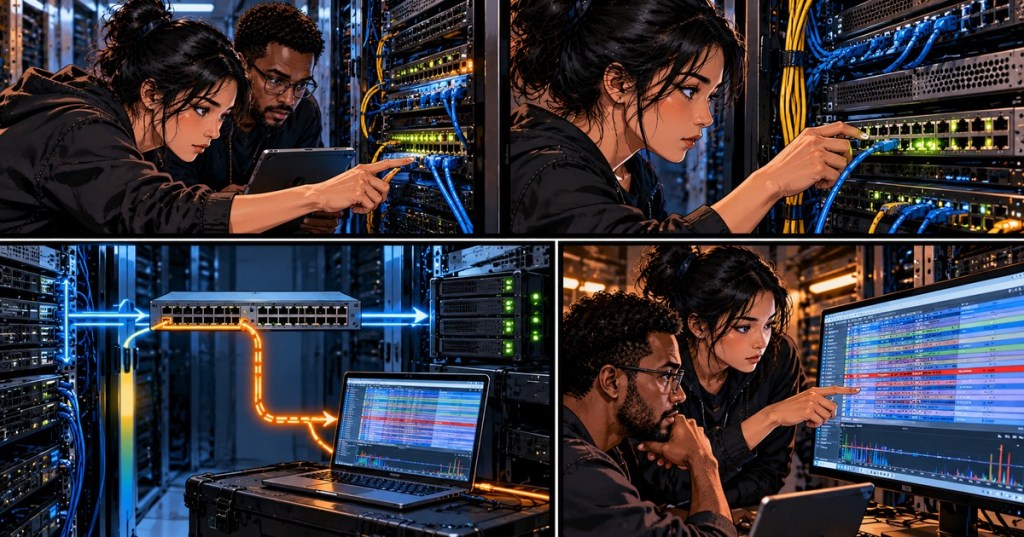
OSNTC.035 — Switch Port Mirroring (SPAN) and Packet Capture. A managed Ethernet switch normally forwards unicast traffic only toward its intended destination. That means a technician’s laptop on another switch port cannot automatically see every frame exchanged by a troubled server. Port mirroring, often called SPAN (Switched Port Analyzer), makes a copy of selected switch traffic for an authorized packet capture. This focused lesson follows OSNTC.034 on EtherCAT and builds on OSNTC.021 on troubleshooting switch ports.
Learning Objectives
- Identify the source port, mirror destination port, and capture computer.
- Explain ingress, egress, and bidirectional mirroring.
- Perform an authorized capture and understand why a SPAN capture can miss packets.
What Is SPAN?
Suppose a mining controller or server is plugged into switch port 5. The technician wants to inspect its DHCP exchange without disconnecting it. A network administrator configures port 5 as the SPAN source and another unused port, such as port 8, as the destination. The capture laptop receives copies of selected frames on port 8 while ordinary production traffic follows its original path. Cisco’s Catalyst 1200 SPAN command guide documents this source/destination behavior; the Wireshark Ethernet capture guide explains how to analyze mirrored frames.
Receive (Rx) means frames entering a selected source interface; transmit (Tx) means frames exiting it. Mirroring both directions can show the request and reply, but also increases the amount of copied traffic. On many platforms, the destination port is reserved for monitoring rather than ordinary switching. Do not move an active production uplink into a mirror-destination role.
Cisco’s official video, “How to Configure Switch Port Mirroring on Cisco Devices,” explains the core switch-port mirroring concept. Commands and menus differ by platform; confirm the exact switch model before making changes.
An Authorized Capture Workflow
- Define the question. Example: Did a server send a DHCP Discover, and did it receive a response? See OSNTC.025 on DHCP troubleshooting for the four-message exchange.
- Get approval. Confirm the correct switch, interface names, maintenance window, access authorization, capture duration, and data-retention policy.
- Choose the source and destination. Select only the port or VLAN necessary to answer the question. Connect an appropriately rated capture NIC to the authorized monitor port.
- Review the proposed mirror. Check whether it copies Rx, Tx, or both; whether VLAN tags are retained; whether the mirror port can receive ordinary traffic; and whether the destination bandwidth is sufficient.
- Verify configuration. On a supported Cisco Catalyst switch,
show monitor sessiondisplays the configured source and destination. Do not assume the syntax is identical on MikroTik or other switch families. - Capture and observe. Select the capture NIC in Wireshark, start a short, time-stamped capture, and use a display filter relevant to the issue, such as
bootpfor DHCP/BOOTP traffic. A filter narrows what is displayed; it does not manufacture packets that were not captured. - Stop and restore. End the capture, have the authorized operator remove temporary mirroring, confirm the original switch configuration, and securely retain or delete the packet file according to policy.
In a networking discussion about SPAN and Wireshark, engineers explain that a monitor port supplies copied traffic while Wireshark or another analyzer records the frames. They also distinguish local SPAN from methods intended to carry mirrored data between network devices.
Practitioner discussion: when a SPAN destination is needed and how a capture laptop receives switch-traffic copies. This is supplementary operational context, not a replacement for the manufacturer’s manual.
What SPAN Does Not Guarantee
A mirrored capture is not automatically a lossless record. If two directions or multiple source ports together carry more traffic than the destination link can transmit, mirrored packets may be dropped. The switch can also replicate only the traffic visible at the selected source, and some platforms alter timestamps, omit error frames, or handle VLAN tags differently. A captured TCP retransmission may be meaningful, but a packet absent from an overloaded SPAN capture is not proof it never crossed the production network. Wireshark documents switch mirroring limitations; use a suitable network TAP when a higher-fidelity physical capture is required.
For a practical demonstration using a real switch and a capture laptop, the following video walks through traffic duplication and analysis. The purpose here is observing packet behavior, not making unsupervised changes to a production network.
Star Master Afghan Academy, “SPAN (Port Mirroring) with Wireshark on Real Switch” (August 2026). This hands-on demonstration shows source/destination selection and live traffic collection.
A Safe Data-Center Example
A server appears reachable by IP but cannot resolve a hostname. Before altering network or DNS settings, the technician coordinates a mirror of the server-facing port and inspects DNS requests and responses in Wireshark. OSNTC.026 on DNS troubleshooting explains how to interpret NXDOMAIN, SERVFAIL, and resolver behavior. The capture can help locate the failure, but sensitive payloads and other users’ traffic may be present; keep filters, access, retention, and sharing tightly scoped.
Engineers comparing local SPAN, RSPAN and ERSPAN in another on-demand packet-capture discussion describe why permanent sensors and remote capture systems are sometimes preferable to moving a laptop from rack to rack. Remote designs add configuration and bandwidth considerations; this introductory lesson is limited to local port mirroring.
Network engineers discuss on-demand capture stations, local SPAN, RSPAN and ERSPAN. Their examples reinforce the need to select a capture method appropriate to the switch and traffic volume.
Safety, Privacy and Conclusion
Packet captures can contain credentials, internal addresses, session identifiers and business data. Capture only traffic you are authorized to inspect. Do not enable promiscuous monitoring across a production VLAN without explicit approval. Verify that temporary mirror settings were removed afterward. The fundamental idea is simple: SPAN copies selected traffic for observation; it does not diagnose the packets for you or guarantee none were lost.
Knowledge Check
- What is the difference between a SPAN source and destination?
- What do Rx and Tx mean when mirroring a source port?
- Why might the capture miss packets even though the production link is healthy?
- What should happen to a temporary SPAN session when troubleshooting is finished?
Answers: 1. The source is monitored; the destination receives copies for the analyzer. 2. Frames entering versus leaving the source interface. 3. Mirror-port oversubscription, hardware limitations or the wrong source selection. 4. The authorized operator removes it and confirms restoration of the original configuration.
BitcoinVersus.Tech Editor’s Note: We volunteer daily to ensure the credibility of the information on this platform is Verifiably True. If you would like to support to help further secure the integrity of our research initiatives, please donate using the QR code provided

For best QR-code scanning results, please scan this donation code from a desktop or larger screen. Mobile screens may prevent camera recognition.


Leave a Reply