November 3, 2026 — Video games depend on more than processor speed. Every scene loads and reuses code, geometry, textures, sound and simulation data through a hierarchy of physical memory. System RAM, graphics memory, on-chip caches and solid-state storage serve different purposes, and confusing their specifications can lead to costly upgrades with little improvement in gameplay.
A modern gaming PC commonly loads installed game files from an SSD into system memory, prepares assets with the CPU and transfers graphics resources into video RAM. The GPU then reuses frequently needed data through its internal caches. Some systems use shared physical memory, while newer loading APIs offer more direct paths for selected data. The central design goal remains consistent: keep useful information close to the processor that needs it. BitcoinVersus.Tech’s January 2025 lesson on RAM and ROM established the distinction between volatile working memory and retained files; an even earlier PCI Express introduction describes a bus that connects graphics cards and fast storage to the computer.
System RAM Holds the Active Game World
DDR4 and DDR5 memory modules provide working space for game logic, operating-system services, physics, application processes and asset staging. Capacity is measured in gigabytes (GB). Data transfer rates are usually expressed in megatransfers per second (MT/s); memory timing and latency also affect how quickly data arrives. The March 2025 guide to installing compatible RAM explains DIMMs, form factors and DDR generations. Another early lesson on 72-bit ECC memory in servers describes reliability priorities that differ from ordinary gaming PC configurations.
Intel’s gaming-memory guide recommends at least 16 GB for modern PC gaming, with more capacity for heavier multitasking. Thirty-two gigabytes can help when games, browsers, voice chat, recording tools and large modifications compete for space. Greater capacity does not guarantee more frames per second when the existing installation already meets peak demand. The site’s April 2025 custom PC build guide places gaming memory choices alongside processor, motherboard and storage selection.
Linus Tech Tips tests the gaming impact of higher-priced DDR5 memory in February 2026. Results vary by processor, motherboard and workload, so the video is illustrative rather than a universal speed ranking.
VRAM Stores Graphics Resources Close to the GPU
A discrete graphics card usually has separate video RAM, often GDDR6 or GDDR7, soldered around its processor. It holds texture maps, geometry, render targets, depth buffers and other resources needed for rendering. Samsung’s GDDR7 technical overview describes graphics DRAM designed for high data throughput. GDDR is not an interchangeable replacement for the DDR modules installed in ordinary motherboard slots.
Video memory capacity and bandwidth answer different questions. Capacity specifies how much data fits near the GPU; bandwidth describes the theoretical maximum data transfer per second. A hypothetical 192-bit interface with 20-gigabit-per-second signaling per pin yields 480 GB/s of raw theoretical bandwidth: 192 × 20 ÷ 8. Real performance depends on the memory controller, cache hits, access patterns and rendering workload—not the headline bandwidth number alone.
High-resolution texture packs and demanding ray-tracing workloads may exceed a card’s practical VRAM budget, causing paging, late texture uploads or frame-time spikes. Texture quality, resolution and background GPU applications can change demand. An existing BitcoinVersus.Tech VRAM explainer covers dedicated graphics memory in greater detail.
Techquickie explains graphics-memory bus width and VRAM bandwidth. Video published in 2022; the concepts remain relevant, while particular card configurations have changed.
GPU Cache and CPU Cache Reduce Repeated Data Fetches
Processors include small, fast static-memory caches that retain recently or repeatedly accessed data. CPU L1, L2 and L3 caches serve instruction and data access; GPUs also have multiple cache levels. AMD’s device-hardware glossary identifies on-chip graphics L1 cache and Infinity Cache, a last-level cache on supported Radeon GPUs. Cache capacity is not interchangeable with installed VRAM capacity.
A cache hit can avoid a more expensive memory transaction; a miss may require access to slower or more distant memory. Accordingly, two GPUs with similar memory-bus bandwidth can perform differently because of cache design, shader resources, compression and software access patterns. The distinction between SRAM and DRAM is explained in BitcoinVersus.Tech’s SRAM versus DRAM guide.
SSDs Feed Game Data but Do Not Replace RAM
An SSD stores game installations persistently, including files that remain after shutdown. An NVMe SSD can serve many small requests with low overhead, while Microsoft’s DirectStorage API allows compatible games to take greater advantage of fast storage and decompression. Developers must integrate supported features; installing an NVMe drive alone cannot activate them inside every game. BitcoinVersus.Tech’s February 2025 M.2 overview separates physical drive formats from interfaces, while the early RAM-versus-flash comparison explains the difference between volatile memory and nonvolatile NAND storage.
Moving a game from a mechanical hard drive to an SSD often improves loading and asset streaming. Replacing an already capable SSD with a faster model may show a smaller difference and will not necessarily raise steady-state frame rates. Compare real loading tests and observed stutter instead of assuming that sequential GB/s specifications equal game performance. The original hardware lessons include a March 2025 overview of storage devices, an April 2025 SSD-versus-HDD comparison and NVMe versus SATA SSDs. Later coverage compares consumer SSD models and charts the growth of game-installation sizes.
Linus Tech Tips explains DirectStorage and game-asset streaming in a 2022 demonstration. The early demonstration is historical context, not proof that every current game benefits.
Unified Memory Changes the Layout
Many consoles, handheld devices and integrated graphics processors share a physical memory pool between CPU and GPU work. Shared memory can reduce unnecessary copies, but both processors compete for capacity and bandwidth. A console’s advertised memory total cannot therefore be compared directly with a desktop computer’s separate system-RAM and VRAM totals. Available budgets, reserved operating-system space and memory-controller design matter.
How to Diagnose a Memory Bottleneck
First measure frame times, not only average FPS. Repeated spikes when entering new locations may point to asset streaming, insufficient memory, shader compilation or unrelated CPU stalls. Memory-allocation failures and leaks are a separate software concern explained in the April 2025 Free Heap Memory Explained lesson. Consistent low FPS at high resolution may indicate GPU processing limits rather than inadequate VRAM. Monitor actual memory usage, review game-specific requirements and test a single change at a time.
If the system runs out of RAM, closing background programs or adding compatible capacity is more useful than purchasing flashy high-frequency modules. If VRAM pressure is the problem, lower textures or rendering demands before replacing the GPU. If loading dominates, inspect the game installation drive and streaming implementation. A balanced memory hierarchy generally matters more than the largest number printed on any one component.
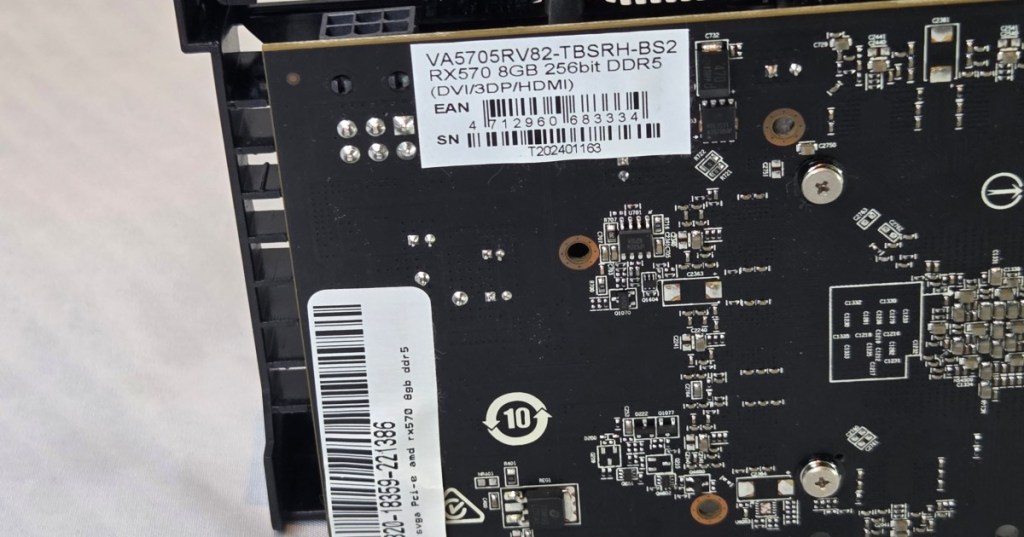
Image credit: Featured photograph shows a Radeon RX 570 graphics-card circuit board with GDDR5 packages. Sebastiaan Broekhoven / ITEagle Europe, Wikimedia Commons, CC BY-SA 4.0; adapted by cropping. The photographed card illustrates physical GPU memory, not current GDDR7 hardware.
BitcoinVersus.Tech Editor’s Note: We volunteer daily to ensure the credibility of the information on this platform is Verifiably True. If you would like to support our work and help further secure the integrity of our research initiatives, please scan the QR code below to donate 5,000 sats. For best results, scan the QR code from a laptop or larger screen.

On mobile, display the QR code on another screen to scan it with a Bitcoin wallet; alternatively, use a wallet’s saved-image QR-scanning feature if available. Bitcoin donation address: 3C9o19EH5HSiwEPyCTmEKzxhNCbo2X6TTb.
BitcoinVersus.tech is not a financial advisor. This media platform reports on financial subjects purely for informational purposes.


Leave a Reply