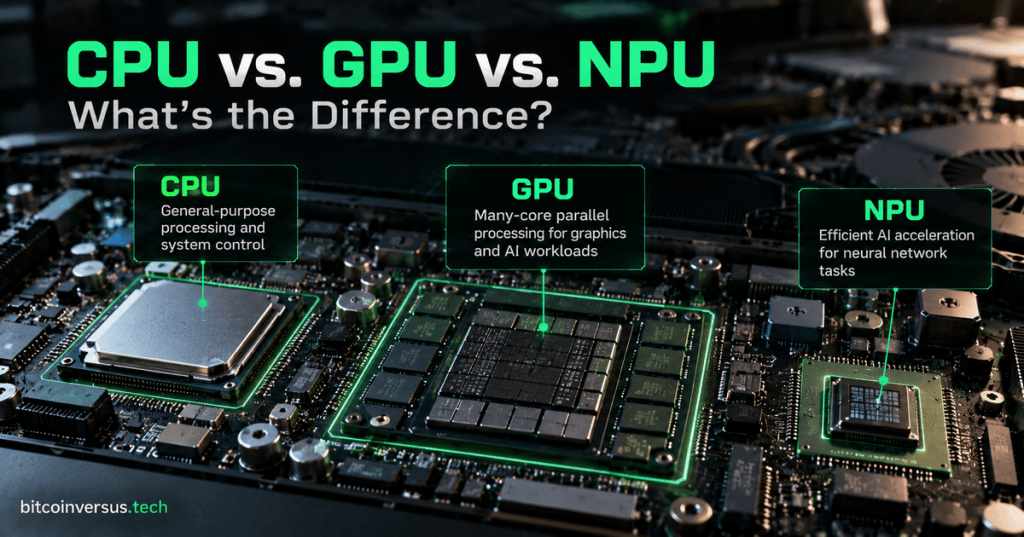
Modern computers increasingly contain three different kinds of processors: a CPU, a GPU, and an NPU. They can all perform calculations, but they are built for different kinds of work.
The easiest way to remember the difference is simple: the CPU is the general manager, the GPU is the large parallel work crew, and the NPU is the efficient AI specialist.
The CPU Is the General-Purpose Processor
CPU stands for central processing unit. It runs the operating system, launches applications, handles logic, manages files, responds to user input, and coordinates many of the other hardware components in the computer.
A CPU usually has a relatively small number of powerful processor cores designed to handle a wide variety of instructions quickly. That makes it good at jobs that change frequently or need strong single-thread performance.
Intel’s CPU vs. GPU guide describes the CPU as the computer’s general-purpose execution engine, while GPUs use many more specialized cores for highly parallel work.
The GPU Is the Parallel Work Crew
GPU stands for graphics processing unit. GPUs were built to calculate huge numbers of pixels, triangles, textures, and other graphics operations at the same time.
That same ability to perform many similar calculations in parallel also makes GPUs useful for video processing, scientific computing, and artificial intelligence. Instead of asking a few powerful cores to do everything, a GPU spreads suitable work across a much larger group of smaller processing units.
This is why GPUs became central to modern AI. Large neural-network models require enormous amounts of matrix math that can be divided across many parallel compute units.
BitcoinVersus.Tech recently covered how Arm is adding matrix-AI capability directly into its CPU and GPU architecture, showing that the borders between these processors are becoming more flexible.
The NPU Is the AI Specialist
NPU stands for neural processing unit. It is a specialized AI accelerator built to run neural-network calculations efficiently, especially AI inference tasks that happen repeatedly on a phone, laptop, camera, robot, or other edge device.
The NPU’s main advantage is efficiency. A CPU or GPU can often run the same AI workload, but the NPU may do it while using less power. That matters for laptops and mobile devices where battery life and heat are important.
Microsoft’s CPU, GPU, and NPU guide explains the same division of labor: the CPU handles general system work, the GPU accelerates graphics and parallel computation, and the NPU accelerates AI features locally.
BitcoinVersus.Tech recently covered MediaTek using dual NPUs in its Dimensity 9600 Pro, an example of phone processors dedicating more silicon specifically to AI workloads.
One Computer Can Use All Three at the Same Time
You do not normally choose one processor and turn the others off. Modern software can send different parts of a job to the processor that handles them best.
For example, during a video call the CPU might run the operating system and meeting software, the GPU might render the interface and video, and the NPU might remove background noise, blur the background, or keep your face centered in the frame.
That three-part design is becoming normal in AI PCs. BitcoinVersus.Tech’s coverage of Intel Panther Lake systems shows CPU, GPU, and NPU engines being integrated into the same client-computing platform.
Which One Is Fastest?
There is no single answer because “fastest” depends on the workload.
A CPU can be fastest for a short, complicated task that cannot be divided easily. A GPU can dominate when millions of similar calculations can run in parallel. An NPU can be the best choice when an AI workload needs to run continuously without wasting battery power.
The important question is not which processor is universally better. It is which processor is best suited to the specific job.
The Simple Mental Model
CPU = general-purpose control and computing.
GPU = massive parallel computing for graphics, video, and AI.
NPU = efficient specialized acceleration for neural-network and AI tasks.
Modern computers increasingly use all three together. The result is not three competing processors. It is a team of processors, each taking the kind of work it was designed to handle best.
BitcoinVersus.Tech
Advertisement
Editor’s Note
BitcoinVersus.Tech publishes technical explainers and reporting for informational and educational purposes.
BitcoinVersus.tech is not a financial advisor. Content is provided for informational purposes.


Leave a Reply