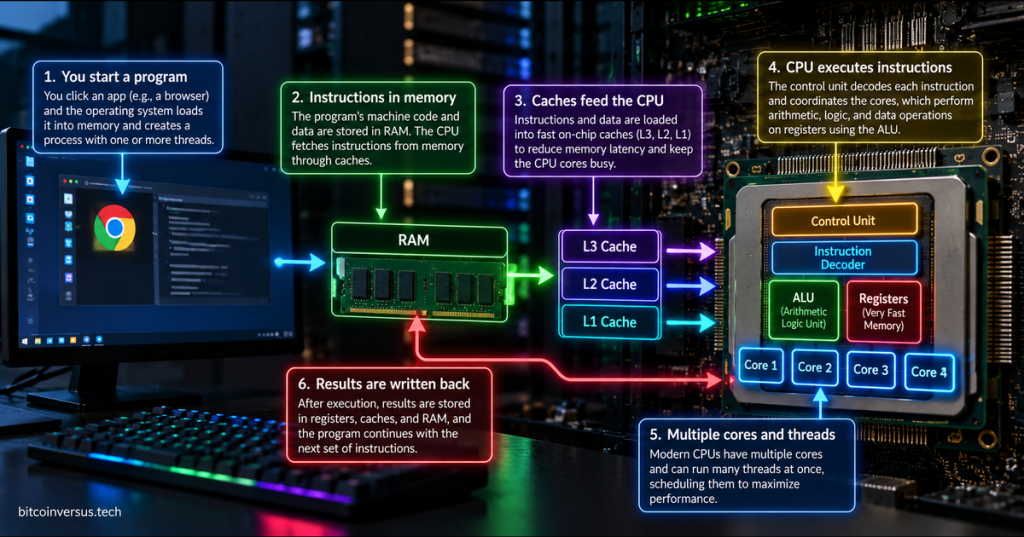
When you click an application, the computer does not simply “turn the program on.” The operating system loads the program, creates a process, gives it memory, and schedules one or more threads onto the CPU.
From there, the processor repeatedly follows the same basic idea: fetch an instruction, decode what it means, execute it, and move on to the next instruction.
1. The Program Starts on Storage
Before a program runs, its executable file usually sits on persistent storage such as an SSD. That file contains machine code, data, and other information the operating system needs in order to launch it.
That connects directly to our earlier guide on how source code becomes an executable. A compiler can turn source code into machine instructions, but those instructions still have to be loaded and executed by the computer.
2. The Operating System Loads It Into RAM
When you start the program, the kernel creates a process and maps the program into memory. Much of the code and working data the CPU needs ends up in RAM.
The program may also load shared libraries, configuration data, images, fonts, network data, and other resources. The important idea is that the CPU works primarily with instructions and data that are available through the memory system—not by directly reading an entire application from storage every time it needs the next instruction.
3. CPU Cache Brings Important Data Closer
Modern processors are much faster than main memory, so they rely on very fast cache memory to keep frequently needed instructions and data closer to the execution units.
Typical CPUs use multiple cache levels such as L1, L2, and L3. Smaller caches are usually faster and closer to the individual core, while larger caches hold more data but may take longer to access. Good cache behavior keeps the processor from spending as much time waiting for slower memory.
4. Fetch: Get the Next Instruction
The CPU keeps track of where it is in the instruction stream using a register often called the program counter or instruction pointer. During the fetch stage, the processor retrieves the next machine instruction from the memory hierarchy.
Intel’s educational material describes the same basic cycle as fetch, decode, and execute: the processor first gets a software instruction from memory, then determines what it means, and finally performs the requested operation.
For a primary reference, see Intel’s Journey Inside: Microprocessors material.
5. Decode: Figure Out What the Instruction Means
Machine instructions are encoded as binary values. The processor’s instruction decoder examines those bits and determines which operation is being requested, which registers or memory locations are involved, and which execution hardware needs to handle the work.
An instruction might mean “add these two numbers,” “compare these values,” “load data from memory,” “store this result,” or “jump to a different instruction.” The decode stage turns that binary instruction into internal control signals the processor can act on.
6. Execute: Do the Actual Work
The execution stage is where the processor performs the requested operation. Integer math and logic are commonly handled by an arithmetic logic unit, or ALU. Other units may handle floating-point math, vector instructions, branches, loads and stores, encryption, or specialized operations.
Arm’s processor documentation breaks modern CPU operation into components such as instruction fetch, decode, dispatch, integer execution, load/store units, caches, and floating-point or SIMD hardware. That is a useful reminder that the simple fetch-decode-execute model is the foundation, not the full internal complexity of a modern processor.
See Arm’s Cortex-A72 processor component documentation for a real example of fetch, decode, dispatch, execution, and memory-system blocks inside a CPU.
7. Registers Hold the Fastest Working Values
Registers are tiny storage locations inside the CPU. They hold things the processor needs immediately: numbers being calculated, addresses, instruction state, counters, and intermediate results.
Registers are much smaller than RAM, but they are directly integrated into the processor’s execution path. The CPU constantly moves values among registers, cache, and memory as instructions run.
8. Results Are Written Back
After an instruction executes, its result may stay in a register, be written into cache or RAM, change the next instruction address, or trigger another part of the system.
For example, a calculation may update a value in memory. A load instruction may bring data from memory into a register. A branch instruction may change which instruction comes next. A system call may hand control to the kernel so the program can request a file, network operation, timer, device, or other operating-system service.
Modern CPUs Do More Than One Instruction at a Time
The simple fetch → decode → execute model is excellent for learning, but modern processors overlap work aggressively. Instruction pipelines let one instruction be fetched while another is being decoded and another is executing.
Modern CPUs can also use branch prediction, multiple execution units, speculative execution, out-of-order execution, SIMD, and multiple threads and cores to keep more hardware busy at once.
That is why a processor rated at several billion clock cycles per second is not simply performing one complete program instruction per clock. Real throughput depends on the instruction mix, cache behavior, pipeline state, branch prediction, memory latency, available execution units, and software design.
Multiple Cores Let More Threads Run in Parallel
A modern multicore CPU contains several processor cores on the same package. The operating-system scheduler decides which runnable threads should get time on those cores.
One program may use several cores at once if its software is designed for parallel work. At the same time, the operating system can run threads from many unrelated applications across the available processing resources.
The Simple Mental Model
Program on SSD → process in RAM → thread scheduled on CPU → fetch → decode → execute → result → repeat.
The CPU is not “understanding” an application the way a person does. It is executing an enormous stream of very small machine instructions at extremely high speed. Everything from opening a browser to rendering a game ultimately becomes combinations of loads, stores, arithmetic, logic, comparisons, branches, and other processor operations.
Once you understand that chain, earlier concepts fit together: the boot process starts the operating system, the kernel manages the machine, device drivers connect software to hardware, processes and threads organize running work, and the CPU turns that work into executed instructions.
BitcoinVersus.Tech
Advertisement
Editor’s Note
BitcoinVersus.Tech publishes technical explainers and reporting for informational and educational purposes.
BitcoinVersus.tech is not a financial advisor. Content is provided for informational purposes.


Leave a Reply