
CUDA is NVIDIA’s parallel-computing platform and programming model for using GPUs as general-purpose processors. Instead of limiting a graphics processor to drawing pixels, CUDA lets software send ordinary computational work—matrix math, simulation, image processing, machine learning, scientific modeling, analytics, and much more—to thousands of GPU threads running in parallel.
NVIDIA introduced CUDA in 2006 and released CUDA Toolkit 1.0 in 2007. As of October 2026, NVIDIA’s official CUDA Toolkit archive lists CUDA 13.4.2 as the latest production release. Nearly two decades after its introduction, CUDA has become one of the central software layers behind modern accelerated computing.
NVIDIA Developer’s Modern CUDA C++ Programming Class walks through contemporary CUDA programming concepts, memory spaces, parallel execution, and higher-level C++ tools.
CUDA at a Glance
- Developer: NVIDIA.
- Introduced: 2006; CUDA Toolkit 1.0 shipped in 2007.
- Purpose: General-purpose parallel computing on NVIDIA GPUs.
- Main execution model: SIMT, or Single Instruction, Multiple Threads.
- Primary programming environments: CUDA C++, CUDA Python and GPU-accelerated libraries used by higher-level frameworks.
- Compiler/toolchain: NVCC plus NVIDIA’s runtime, driver interfaces and developer tools.
- Common fields: AI, scientific computing, HPC, engineering, rendering, analytics, finance, computational biology and simulation.
- Current evolution: Traditional thread-level SIMT now coexists with CUDA Tile, a higher-level tile programming model.
Why CUDA Was Created
GPUs were originally designed primarily for graphics. Graphics workloads contain enormous amounts of parallel work: millions of pixels, vertices and fragments can often be processed independently. That pushed GPU designers toward architectures with large numbers of relatively simple execution units and extremely high memory bandwidth.
Researchers eventually realized that the same hardware could accelerate non-graphics problems. Before CUDA, general-purpose GPU computing often required developers to disguise numerical data as textures and express calculations through graphics APIs and shaders. CUDA gave developers a direct programming environment designed specifically for computation.
That shift helped turn the GPU from a specialized graphics accelerator into a general computing device. The result is visible today in everything from weather simulations and molecular dynamics to the massive AI training workloads running inside modern data centers.
NVIDIA described CUDA 13.1 as the platform’s largest expansion since CUDA launched, highlighting CUDA Tile as a new higher-level way to program GPUs.
CUDA Is More Than a Programming Language
CUDA is sometimes described casually as a language, but that is incomplete. CUDA is a platform containing a programming model, compiler toolchain, runtime, driver APIs, optimized libraries, debugging tools, profilers and hardware abstractions.
Developers can write CUDA C++ directly, use Python interfaces, call optimized CUDA libraries, or use frameworks that generate or dispatch CUDA work behind the scenes. A PyTorch user, for example, may never write a CUDA kernel manually while still executing enormous amounts of CUDA-powered computation.
This abstraction is one reason CUDA became so important to AI. BitcoinVersus recently covered how AI systems are beginning to generate and tune CUDA kernels themselves, pushing automation deeper into a programming layer that historically required highly specialized GPU engineers.
The CPU Is the Host and the GPU Is the Device
The traditional CUDA model is heterogeneous: the CPU and GPU work together. NVIDIA’s CUDA Programming Guide calls the CPU side the host and the GPU side the device.
A CUDA application normally begins on the CPU. Host code allocates memory, prepares data, launches work on the GPU and coordinates results. The function that executes on the GPU is called a kernel. Launching a kernel can create thousands or millions of GPU threads that all execute the kernel in parallel on different pieces of data.
A common CUDA launch might conceptually look like vector_add<<<blocks, threads>>>(...). The unusual triple-chevron syntax tells CUDA how many blocks and threads should execute the kernel.
Threads, Blocks and Grids
The basic CUDA execution hierarchy is thread → block → grid.
- A thread is the smallest programmer-visible unit of CUDA parallel work.
- A thread block groups threads that can cooperate efficiently, synchronize and share fast on-chip shared memory.
- A grid contains all the thread blocks launched for a kernel.
Threads and blocks can be organized in one, two or three dimensions. That makes CUDA natural for problems such as images, matrices, volumes and simulation grids because the software’s thread layout can mirror the structure of the data.
Streaming Multiprocessors and Warps
NVIDIA GPUs are built from groups of execution resources called Streaming Multiprocessors, or SMs. CUDA schedules thread blocks onto available SMs. A block executes on one SM, giving its threads access to shared resources such as registers and shared memory.
Inside a block, hardware organizes threads into groups of 32 threads called warps. A warp executes using NVIDIA’s SIMT model—Single Instruction, Multiple Threads. Threads in a warp execute the same instruction stream but maintain their own state and can follow different branches.
When threads in the same warp take different branches, the GPU may need to execute multiple paths while masking threads that are not participating. This is called warp divergence. Avoiding unnecessary divergence is one of many ways CUDA programmers improve performance.
CUDA Memory Matters as Much as Compute
GPU speed is not simply about arithmetic units. Moving data efficiently is often the harder problem. CUDA exposes several memory types with very different performance characteristics.
- Registers: very fast storage local to individual threads.
- Shared memory: fast on-chip memory shared by threads inside a block.
- Global memory: large device memory accessible across the GPU, usually backed by GDDR or HBM.
- L1 and L2 caches: hardware caches that reduce expensive global-memory traffic.
- Constant memory: read-focused memory optimized for certain shared access patterns.
- Unified Memory: a CUDA mechanism that can simplify movement and placement of data across CPU and GPU memory spaces.
Good CUDA software tries to perform useful computation while minimizing unnecessary memory movement. Coalesced global-memory access, intelligent use of shared memory, cache behavior and asynchronous data transfers can matter as much as raw FLOPS.
What NVCC Does
NVCC is NVIDIA’s CUDA compiler driver. CUDA C++ applications contain both host code and device code. NVCC separates the portions that execute on the CPU from GPU kernels and coordinates compilation for both sides.
GPU code can pass through NVIDIA’s PTX intermediate representation before being compiled into machine instructions for a specific GPU architecture. PTX helps CUDA software remain portable across generations because code can target a virtual GPU instruction model rather than only one physical chip.
CUDA Libraries Are a Major Part of the Platform
Many developers never need to write low-level kernels because NVIDIA ships highly optimized libraries for common workloads.
- cuBLAS: dense linear algebra and matrix operations.
- cuFFT: fast Fourier transforms.
- cuSPARSE: sparse matrix operations.
- cuDNN: deep-neural-network primitives.
- NCCL: high-performance communication between GPUs and nodes.
- CUTLASS: templates and components for high-performance matrix and tensor operations.
These libraries are heavily optimized for NVIDIA architectures. Frameworks can call them directly, allowing developers to benefit from architecture-specific optimization without maintaining their own assembly-level GPU kernels.
NVIDIA CUDA architect Stephen Jones explains recent CUDA features and the direction of the platform at GTC 2026.
Why CUDA Became So Important to AI
Neural networks are dominated by operations that map extremely well to GPUs, especially matrix multiplication, convolutions, reductions and tensor operations. CUDA gave researchers and framework developers a mature way to expose that GPU throughput.
The modern AI stack usually contains several layers. A researcher may write Python in PyTorch while PyTorch dispatches operations to CUDA libraries, those libraries launch optimized kernels, and the GPU executes the work across SMs, warps and tensor cores. CUDA is often invisible at the top of that stack even though it is doing critical work underneath.
CUDA also matters outside giant servers. Systems such as NVIDIA’s Grace Blackwell-based local AI PCs bring the same CUDA software ecosystem into smaller developer and workstation environments.
CUDA Is Not Just for AI
AI may be CUDA’s most visible workload today, but general-purpose GPU computing is much broader. CUDA is used for computational chemistry, fluid dynamics, seismic processing, medical imaging, financial modeling, ray tracing, signal processing, engineering simulation, genomics, astronomy and scientific visualization.
The central requirement is parallelism. A workload becomes a strong GPU candidate when large numbers of similar operations can be performed independently or with limited coordination. Workloads dominated by serial control flow, small data sets or frequent unpredictable branching may gain less from moving to a GPU.
What Is Compute Capability?
NVIDIA assigns CUDA-capable GPUs a compute capability number. It identifies the hardware feature set exposed by a GPU architecture. Software can use compute capability to determine which instructions, memory features, tensor operations or execution capabilities are available.
This is different from the CUDA Toolkit version. A toolkit is software; compute capability describes the GPU architecture. Compatibility therefore depends on several layers at once: application code, CUDA runtime, driver, compiler target and physical GPU generation.
CUDA Cores Are Not the Same Thing as CUDA
The phrase CUDA core refers to NVIDIA GPU execution hardware used for arithmetic operations. CUDA is the much larger software platform and programming model. A GPU can contain thousands of CUDA cores, but those cores are only one hardware component underneath the CUDA software stack.
Modern GPUs may also contain Tensor Cores, RT Cores, specialized memory engines and other hardware. CUDA provides software mechanisms that help applications use the broader GPU architecture, not merely the units marketed as CUDA cores.
CUDA Tile Adds a New Programming Model
Traditional CUDA programming gives developers fine-grained control over individual threads. CUDA Tile adds another model: developers describe operations on multidimensional tiles of data, while the compiler maps that work to threads and specialized hardware.
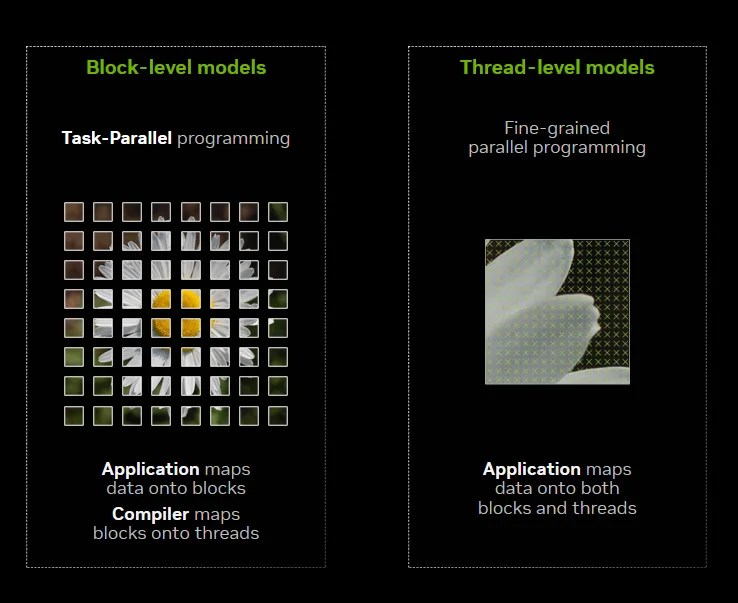
Tile programming does not replace SIMT. Both models coexist. SIMT remains useful when developers need precise control over threads, while tile programming raises the abstraction level for workloads such as matrix and tensor computation.
NVIDIA’s CUDA Tile announcement marked one of the largest changes to the CUDA programming model since the platform’s original release.
CUDA and Python
CUDA began with a C-oriented programming environment, but Python has become one of the most common ways developers reach GPU computing. Python frameworks may call CUDA indirectly, while tools such as Numba can compile Python functions into GPU kernels. NVIDIA’s newer cuTile Python work pushes Python even deeper into GPU kernel programming.
This reflects a broader industry trend toward making specialized accelerators easier to program. Similar efforts appear across other computing platforms, including systems that expose Python and C++ interfaces for nontraditional accelerators.
Where CUDA Is Strong
- Mature ecosystem: CUDA has been developed continuously for nearly two decades.
- Optimized libraries: developers can reuse highly tuned building blocks instead of starting from scratch.
- Strong tooling: Nsight Systems, Nsight Compute, debuggers and sanitizers help developers profile and diagnose GPU code.
- Framework integration: major AI and scientific frameworks already understand the CUDA ecosystem.
- Hardware/software co-design: NVIDIA can evolve GPU architecture and CUDA together.
- Large developer base: extensive documentation, examples, research and community knowledge reduce the learning barrier.
Where CUDA Has Limits
CUDA is proprietary to NVIDIA GPUs. That tight integration is a strength for performance and tooling, but it also creates vendor dependence. Code written specifically around CUDA APIs may require meaningful work to move to AMD, Intel, Apple or other accelerators.
Alternatives and portability layers include OpenCL, AMD HIP/ROCm, SYCL and vendor-specific frameworks such as Apple Metal. None is a perfect one-for-one replacement because their programming models, libraries, tooling and hardware ecosystems differ.
CUDA performance engineering can also become complex. Threads, occupancy, registers, shared memory, memory coalescing, synchronization, instruction mix and communication between GPUs can all affect speed. A correct GPU program is not automatically an efficient GPU program.
Why CUDA Still Matters
CUDA’s long-term importance is not one syntax feature or one GPU generation. Its significance comes from creating a stable software ecosystem around massively parallel processors. Applications written years apart can share concepts, libraries and tools while NVIDIA repeatedly changes the underlying hardware.
That software continuity is a major reason NVIDIA GPUs became deeply embedded in AI and HPC. Developers are not simply buying silicon; they are entering an ecosystem of compilers, libraries, profilers, frameworks, documentation and accumulated code.
CUDA began as a way to use a graphics processor without pretending the workload was graphics. It evolved into an entire accelerated-computing platform—and now, with SIMT, CUDA Tile, Python tooling and highly optimized libraries all coexisting, it continues to change how programmers think about the boundary between software and parallel hardware.
BitcoinVersus.Tech
Editor’s Note: CUDA evolves continuously. Version numbers, supported compute capabilities and individual APIs change over time, while the core concepts in this guide—host/device execution, kernels, threads, blocks, grids, warps, memory hierarchy and accelerated libraries—remain foundational.
We volunteer daily to improve the credibility of the information on this platform. If you would like to support the research, please donate here: 3C9o19EH5HSiwEPyCTmEKzxhNCbo2X6TTb
BitcoinVersus.tech is not a financial advisor. This media platform reports on technical and financial subjects purely for informational purposes.


Leave a Reply