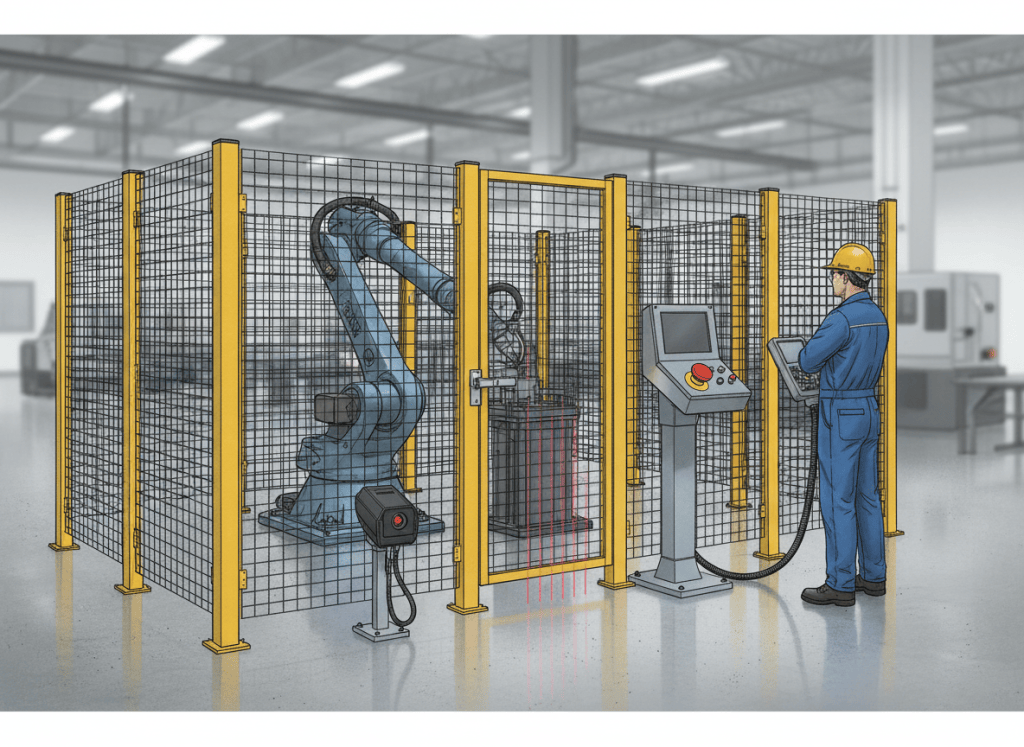
A robotics technician’s first job is not making the robot move. It is knowing when the robot must not move, what can still move after a stop, and what conditions must be proven before a person enters the hazardous space.
This is OSRTC.001, the first lesson in the Open Source Robotics Technician Certification track. It establishes the safety vocabulary and technician habits required before later lessons on teach pendants, jogging, homing, calibration, encoders, actuators, preventive maintenance, wiring, fault recovery, and end effectors.
The safety model in one picture
hazardous robot motion + tooling + stored energy
↓
risk assessment identifies who can be exposed and how
↓
guards + interlocks + presence sensing reduce access risk
↓
safety-rated stop functions respond when safeguards are triggered
↓
manual/teach mode adds reduced motion + enabling controls
↓
maintenance requiring hazardous-zone access uses lockout/tagout and energy isolation
↓
verification before entry + controlled reset before restart
OSHA notes that many robot accidents occur during non-routine conditions such as programming, maintenance, testing, setup, and adjustment—exactly the work technicians often perform. See the current OSHA Robotics overview and the updated OSHA Technical Manual chapter on industrial robot systems.
1. Robot, work envelope, and safeguarded space are not the same thing
- Robot: the programmable manipulator itself.
- End effector: the tool attached to the robot wrist—gripper, welder, suction cup, screwdriver, cutter, dispenser, and so on.
- Work envelope: the volume the robot can physically reach through its possible motions.
- Robot cell: the robot plus tooling, fixtures, conveyors, guarding, controls, sensors, and other integrated equipment.
- Safeguarded space: the space where access is controlled by guards or protective devices because hazardous motion or energy may exist.
The hazard does not stop at the robot arm. A gripper can crush, a fixture can clamp, a pneumatic cylinder can extend, a conveyor can pull, and a dropped payload can fall even if the robot itself has stopped.
2. The main hazard families
- Impact: the robot, payload, or end effector strikes a person.
- Crush and pinch: a person is trapped between the robot and a fixed object, fixture, fence, machine, or another axis.
- Shear/cut/puncture: sharp tooling, weld equipment, cutters, drills, or moving mechanisms create process-specific hazards.
- Unexpected startup: automatic restart, remote commands, program execution, control faults, or another person initiating motion.
- Electrical energy: controller cabinets, drives, motors, capacitors, and connected equipment may remain energized.
- Pneumatic/hydraulic energy: pressure can remain trapped after electrical motion stops.
- Gravity and stored mechanical energy: raised axes, springs, counterbalances, payloads, or fixtures can move after power removal.
- Process hazards: welding arc, heat, laser, chemicals, chips, fumes, or high-pressure fluids may belong to the application even when robot motion is controlled.
3. E-stop: emergency action, not routine safeguarding
An emergency stop is a manually initiated emergency function intended to stop hazardous operation when a dangerous situation is recognized. It is not a substitute for perimeter guarding, presence sensing, safe entry procedures, or LOTO.
- Know every E-stop location before beginning work.
- An E-stop should be readily identifiable and accessible.
- Pressing an E-stop does not prove every energy source is isolated.
- Releasing or resetting an E-stop must not be treated as permission to restart blindly.
- The cause of the emergency condition must be understood before motion resumes.
A useful current manufacturer example is Universal Robots’ safety documentation, which explicitly distinguishes an Emergency Stop from a safeguard/protective stop and states that an E-stop is for emergency purposes rather than normal safeguarding.
Video 1: ABB emergency stop behavior
4. Safeguarding: keep people separated from hazardous motion
Safeguarding is normally layered. One device rarely controls every hazard.
- Fixed perimeter fencing: prevents casual entry into a hazardous robot cell.
- Interlocked gates: opening the access gate changes the safety state and prevents normal automatic operation.
- Light curtains / photoelectric presence sensing: optical beams detect intrusion into a protected opening.
- Safety laser scanners: monitor configured areas and can trigger warning, reduced-speed, or stop behavior depending on the safety design.
- Pressure-sensitive devices: mats or edges can detect presence in certain applications.
- Position and proximity sensing: confirms gate, fixture, axis, or mechanism state where the safety design requires it.
A normal industrial sensor is not automatically a safety-rated device. The full safety function—from sensing device through logic to the final stopping element—must be designed and validated for the required risk reduction.
5. Interlocks and permissives
A robotics cell depends heavily on interlocks and permissives. A permissive asks, “Are all required conditions true before this action is allowed?” An interlock prevents or changes operation when a condition is unsafe or incompatible.
Typical cell logic might require:
gate closed and safety circuit healthy
AND
no E-stop active
AND
fixture in safe state
AND
other machine axes ready
AND
robot controller ready
↓
automatic-cycle start permitted
The technician should understand the underlying control-circuit and ladder-diagram concepts without assuming ordinary PLC logic alone is sufficient for a required safety function.
6. Protective/safeguard stop versus emergency stop
The exact terminology and stop behavior depend on the robot/controller and the applicable safety design, but the conceptual distinction matters:
- Emergency stop: manually triggered because a person recognizes an emergency.
- Safeguard or protective stop: triggered by a protective safety function—for example, an interlocked gate or safety scanner—to protect people during normal safeguarding.
- Operational/program stop: a normal process stop; it should never be assumed to provide personnel protection unless the safety design explicitly says it does.
Do not reduce this to “stopped equals safe.” Ask: what initiated the stop, what category/function is active, what energy remains, what can restart it, and what must happen before entry?
Video 2: ABB SafeMove2
7. Manual/teach mode changes the job, not the laws of physics
Teaching often requires an authorized technician or programmer to work closer to the robot than during automatic operation. That means the risk-control strategy changes.
- Use the manufacturer’s designated manual/teach operating mode.
- Use the required enabling device when the system calls for one.
- Maintain reduced speed and other configured safety limits.
- Keep clear of pinch points and trapped-person locations even at reduced speed.
- Know the effect of releasing, fully squeezing, or correctly holding a three-position enabling device on the specific system.
- Do not defeat gate switches, scanners, or other protective devices to “make troubleshooting easier.”
OSHA’s updated Technical Manual describes manual/teach-mode safeguarding and notes a reduced teach speed of approximately 250 mm/s (10 in/s) in the referenced industrial-robot safety framework. Site and manufacturer requirements still control the actual job.
8. Three-position enabling device
Many industrial systems use a three-position enabling device on the teach pendant:
released → motion not enabled
middle / deliberate hold → manual motion may be enabled
fully squeezed in panic → motion not enabled
The goal is to avoid a control that continues allowing hazardous motion if the operator either lets go or reflexively clenches tightly during an emergency. Exact behavior must be learned from the robot manufacturer’s documentation and the site’s validated safety configuration.
9. LOTO: when a stop is not enough
For maintenance, repair, jam clearing, component replacement, or other servicing where unexpected energization or release of stored energy could injure someone, follow the site’s hazardous-energy procedure and applicable lockout/tagout requirements.
A technician must think beyond the controller’s motor power:
- electrical feeds
- DC-bus/capacitor energy
- pneumatic pressure and vacuum
- hydraulic pressure
- springs and counterbalances
- gravity-loaded axes or payloads
- adjacent conveyors and machines
- tooling with independent energy sources
An E-stop is not an energy-isolation device. A safety-rated stop can stop motion and still leave electrical or other energy available by design.
10. Safe workcell entry: technician sequence
This general sequence is an educational model. The approved manufacturer and site procedure always takes precedence.
- Identify the task. Observation, teaching, fault recovery, jam clearing, maintenance, and component replacement do not have the same controls.
- Identify every hazardous energy source. Robot motion is only one source.
- Determine the required operating state. Automatic, manual/teach, safeguard stop, or full hazardous-energy isolation.
- Stop the process using the approved method.
- Apply LOTO when servicing criteria require it.
- Verify the safe state. Do not assume a screen message or silent motor proves isolation.
- Control access. Prevent another person from unexpectedly resetting, energizing, or starting equipment.
- Perform the work while maintaining awareness of gravity, stored pressure, tooling, and adjacent equipment.
- Account for people and tools before exit.
- Restore guards and protective devices.
- Remove locks/tags only under the approved procedure.
- Reset from outside the hazardous space.
- Warn affected personnel before restart.
- Perform a controlled test before normal automatic operation.
11. Reset is not restart
This distinction prevents bad habits. Reset acknowledges or restores a safety/control condition. Restart initiates machine operation. Good cell design and procedure prevent an access-gate reset from unexpectedly launching automatic robot motion while someone is still exposed.
When troubleshooting limit/proximity sensors, photoelectric devices, or interlocks, never force a signal or bypass a safety function unless an approved, qualified, controlled procedure specifically permits the diagnostic method.
12. Technician pre-shift / pre-work safety check
- Perimeter fence and barriers physically intact.
- Interlocked gates close and latch correctly.
- E-stops are present, accessible, undamaged, and not physically defeated.
- Safety scanners/light curtains are unobstructed and aligned as designed.
- Teach pendant cable, buttons, enabling device, and E-stop appear serviceable.
- No unauthorized jumpers, taped switches, defeated interlocks, or bypassed sensors.
- Fixtures and end effectors are secure.
- Pneumatic/hydraulic hoses and fittings show no obvious damage or leakage.
- Robot base/anchors and visible fasteners show no obvious abnormality.
- No unexpected objects or people are inside the safeguarded space before automatic startup.
13. Safety standards technicians should recognize
The international industrial-robot safety standard was substantially revised in 2025. ISO 10218-1:2025 covers industrial robot safety requirements, while ISO 10218-2:2025 addresses robot applications and robot cells. In the United States, ANSI/A3 R15.06-2025 is the current national industrial robot safety standard family based on those ISO revisions.
OSHA currently states that there is no single OSHA standard written exclusively for the robotics industry; instead, applicable requirements can include hazardous-energy control, machine guarding, electrical, PPE, and other general-industry standards. Standards and site procedures are complementary: a technician still follows the approved machine-specific procedure for the actual task.
Video 3: What changed in modern robot safety standards
14. Real-world example: safety can live beyond the robot controller
Modern systems increasingly coordinate robot safety with external safety controllers, scanners, and cell-level devices. BitcoinVersus.Tech recently covered Agility Robotics and FORT extending Digit 5 safety beyond the robot itself. The technician lesson is the same: evaluate the entire application and safeguarded space, not just the robot arm.
15. Fault response: stop guessing
If a safety circuit will not reset or a robot will not enter automatic operation, do not immediately jumper the input. Troubleshoot the chain logically:
safety device state
↓
wiring / connector state
↓
safety I/O state
↓
safety controller / robot controller diagnostics
↓
interlock/permissive conditions
↓
reset conditions
↓
controlled functional test
Useful prior foundations include control circuit symbols and ladder diagrams, interlocks and permissives, and limit/proximity sensors.
Practice scenarios
- The robot has stopped after a gate opened. Is it automatically safe to climb into the cell? Explain what else must be known.
- A gripper is pneumatic and the robot motors are off. What stored-energy hazard remains?
- An E-stop is pressed during a jam. Why might LOTO still be required before clearing it?
- A photoelectric safety device trips repeatedly. Why is bypassing it to keep production running unacceptable?
- You are in teach mode at reduced speed. Name at least three hazards that can still injure you.
- A safety gate closes and resets. Why should that not automatically mean the robot begins moving?
Knowledge check
1. What is an E-stop for?
A manual emergency action to stop hazardous operation when an emergency is recognized; it is not a substitute for safeguarding or energy isolation.
2. What is an interlocked gate?
A physical access point whose safety state is monitored so opening it changes or prevents hazardous automatic operation according to the safety design.
3. Why can a stopped robot still be dangerous?
Electrical, pneumatic, hydraulic, gravitational, mechanical, process, or adjacent-machine energy may remain.
4. What is the technician’s most important question before entering a cell?
Not merely “Is it stopped?” but “What hazardous energy and motion remain, what can restart them, and what verified safe state does this task require?”
5. What should happen before a safety bypass is used?
Only an approved procedure, authorized/qualified personnel, defined compensating controls, and the specific diagnostic conditions required by the manufacturer/site may permit one. Production convenience is not a justification.
Key takeaway
Robot safety is a system, not a button. A competent technician understands the work envelope, safeguarded space, stop functions, interlocks, presence sensing, teach-mode controls, stored energy, LOTO, safe entry, reset discipline, and the specific manufacturer/site procedure. Only after that foundation is solid does learning how to move and recover the robot become useful.
Safety note: This lesson is general technical education. It does not authorize work on any robot or replace OSHA requirements, consensus standards, a site risk assessment, manufacturer instructions, site-specific LOTO procedures, or qualified-person training.
BitcoinVersus.Tech
Advertisement
Editor’s Note:
We volunteer daily to ensure the credibility of the information on this platform is Verifiably True. If you would like to support our research initiatives, please donate here: 3C9o19EH5HSiwEPyCTmEKzxhNCbo2X6TTb
BitcoinVersus.tech is not a financial advisor. This media platform reports on financial subjects purely for informational purposes.


Leave a Reply